

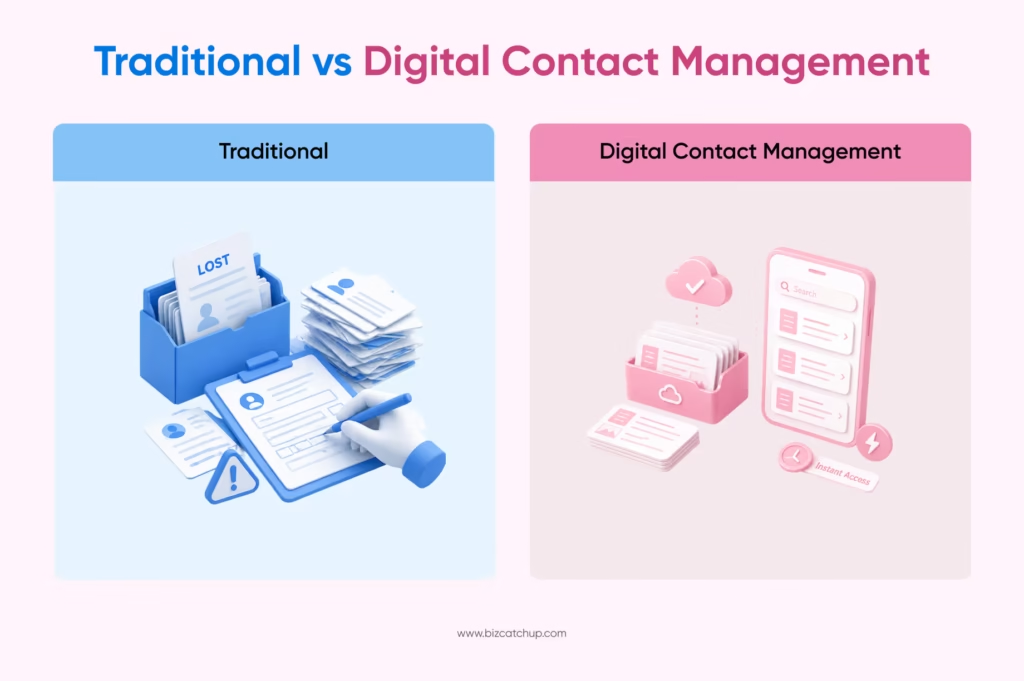
In today’s fast-moving business environment, traditional paper business cards often fall short. They get misplaced, forgotten in stacks, or never make it into your digital workflow. As your network grows, managing contacts manually becomes inefficient and prone to errors, costing you valuable opportunities.
This is where the ability to scan business card details transforms the way you connect. Instead of typing in contact information or storing physical cards, you can instantly digitize, organise, and access every lead in seconds. It’s faster, more accurate, and built for how modern professionals work.
With smart solutions like BizCatchup, you can seamlessly convert physical interactions into structured, actionable data. In this blog, you’ll discover how scanning business cards works, why it matters, and how you can use it to build stronger, more efficient business relationships.
What Does It Mean to Scan a Business Card?
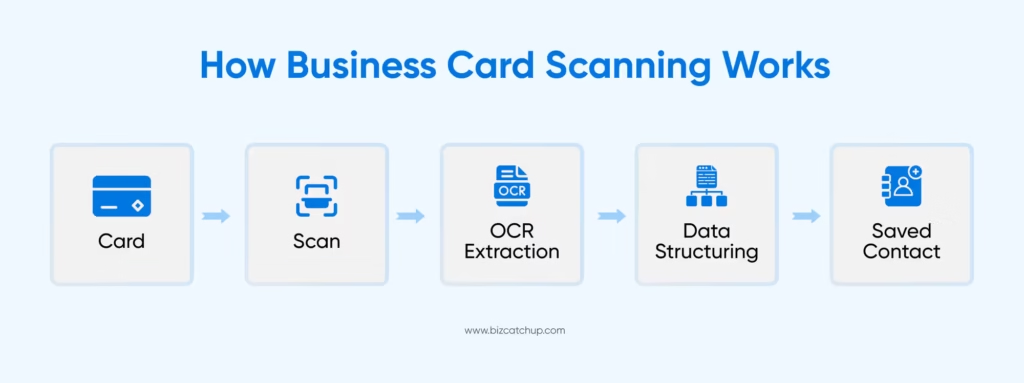
To scan business card details simply means capturing the information printed on a physical card and converting it into a digital contact you can store, search, and manage easily. Instead of manually typing names, phone numbers, and email addresses, you use a smart tool—usually on your phone or desktop—to extract this information in seconds.
At the core of this process is optical character recognition (OCR), a technology that reads text from an image. In simple terms, OCR works like your eyes and brain combined- it looks at the card, recognizes the letters and numbers, and converts them into editable digital data. You don’t need to understand the technical side; all you see is your contact details automatically captured and ready to use.
The difference between manual saving and scanning is significant. Manual entry is time-consuming, error-prone, and often delayed. Scanning, on the other hand, is instant, accurate, and structured—ensuring you don’t lose valuable information.
In today’s fast-paced networking environment, where every interaction counts, the ability to quickly scan and organize contacts ensures you stay responsive, professional, and always ready to follow up.
Why You Should Scan Business Cards Instead of Storing Them Physically
Eliminate Manual Data Entry
When you scan business card details, you remove the need to manually type in contact information. This not only saves you time but also reduces the risk of human errors like typos or missing details. Instead of spending minutes entering data, you capture everything accurately in seconds—freeing you to focus on meaningful conversations and follow-ups.
Never Lose Important Contacts
Physical business cards are easy to misplace, damage, or forget. By digitizing them, you ensure that every contact is safely stored in one place. Whether you’re switching devices or traveling, your contacts remain accessible, backed up, and secure—so no valuable connection slips through the cracks.
Stay Organized and Searchable
Stacks of business cards can quickly turn into clutter. When you scan and store them digitally, you can categorize contacts using tags, notes, or filters. This makes it easy to search for specific people, industries, or events—helping you find the right contact exactly when you need it.
Seamless CRM Integration
Scanning business cards doesn’t just store information—it makes it actionable. Once digitized, contact data can be integrated into your CRM or workflow tools, allowing you to track conversations, schedule follow-ups, and nurture relationships efficiently. This turns every scanned card into a potential business opportunity rather than just another saved contact.
How to Scan Business Cards Efficiently (Step-by-Step Guide)
Step 1: Use a Reliable Business Card Scanner
To scan business card details effectively, start with a reliable tool that’s built for accuracy and ease of use. Platforms like BizCatchup Dashboard allow you to quickly capture and convert contact details into structured digital data. Choosing the right tool ensures faster processing, better OCR accuracy, and seamless organization from the start. See how it works.
Step 2: Capture a Clear Image
The quality of your scan depends heavily on how you capture the image. Make sure the card is placed on a flat surface with good lighting. Avoid shadows, glare, or tilted angles. Keep your camera steady and ensure all text is visible within the frame—this helps the scanner read information correctly.
Step 3: Verify and Edit Details
Even with advanced scanning technology, it’s important to review the extracted information. Take a few seconds to check names, phone numbers, and email addresses for accuracy. Small corrections at this stage prevent communication errors later and ensure your database stays reliable.
Step 4: Save and Organize Contacts
Once verified, save the contact with proper categorization. Add tags such as industry, event name, or priority level. You can also include notes about your interaction to personalize future follow-ups. This step turns a simple contact into a meaningful business connection.
Step 5: Sync Across Platforms
To maximize accessibility, ensure your contacts are synced across devices and platforms. Whether you’re using your phone, tablet, or desktop, having your data updated in real-time allows you to access and act on opportunities anytime, anywhere.
Key Features to Look for in a Business Card Scanner
Accurate OCR Technology
The foundation of any reliable tool to scan business card details is its OCR (optical character recognition) capability. OCR converts printed text into machine-readable data, allowing the scanner to extract names, emails, and phone numbers instantly. A high-quality OCR engine ensures better accuracy, reducing manual corrections and saving you time.
Multi-language Recognition
In a global business environment, you often exchange cards with professionals from different regions. A good scanner should support multiple languages and varied card formats. Advanced OCR systems can recognize diverse fonts and layouts, ensuring consistent data capture across international contacts.
Cloud Storage & Syncing
A powerful scanner doesn’t just capture data—it stores it securely. Cloud storage ensures your contacts are backed up and accessible anytime, anywhere. With automatic syncing, you can access your contacts across devices without worrying about losing important information or switching platforms.
CRM & Integration Capabilities
One of the most valuable features is the ability to integrate scanned data directly into your CRM or workflow tools. Many scanners automatically convert card details into structured contact records, enabling faster follow-ups and streamlined lead management. This turns simple contact storage into a strategic advantage.
Security & Data Privacy
When you digitize contacts, you’re handling sensitive information. A reliable business card scanner should offer secure data storage, encryption, and compliance with privacy standards. Some tools even ensure that scanned data is protected or not stored unnecessarily, giving you full control over your information.
Choosing a scanner with these features ensures that you don’t just capture contacts—you build an efficient, secure, and scalable networking system.
Real-World Benefits of Scanning Business Cards for Professionals
When you scan business card details, you’re not just digitizing information—you’re upgrading how you manage relationships and opportunities across your professional ecosystem.
For sales teams, scanning business cards enables instant lead capture. Instead of relying on memory or delayed data entry, you can store accurate contact details on the spot, ensuring faster follow-ups and higher conversion potential. This shift toward automation aligns with a larger trend—global spending on digital transformation is projected to reach $3.9 trillion by 2027.
For entrepreneurs, it simplifies networking. Whether you’re attending events or meeting clients, scanning allows you to build a structured contact database without the clutter of physical cards—making every interaction more valuable and easier to revisit later.
For marketers, the advantage lies in better campaign follow-ups. With organized and searchable contact data, you can segment audiences, personalize outreach, and track engagement more effectively. In fact, many professionals still struggle with manual processes, highlighting the importance of digital solutions.
For event attendees, especially those managing a high volume of connections, scanning business cards helps organize bulk contacts effortlessly. You can categorize contacts by event, industry, or priority—ensuring no opportunity is missed after the event ends.
In a digital-first world, scanning business cards is no longer just a convenience—it’s a strategic advantage that helps you stay organized, responsive, and ahead in your networking efforts.
Common Challenges When You Scan Business Card (And How to Solve Them)
While the ability to scan business card details makes networking more efficient, it’s not completely free of challenges. The good news is that most issues are easy to fix with the right approach.
Poor Scan Quality
One of the most common problems is capturing unclear or blurry images. Poor lighting, shadows, or tilted angles can affect how accurately information is read. To avoid this, always place the card on a flat surface, use good lighting, and keep your camera steady for a clean capture.
Incorrect Data Extraction
Even advanced OCR tools can occasionally misread characters—especially with unique fonts or layouts. This can lead to incorrect names or contact details. A quick review after scanning helps you catch and correct errors, ensuring your contact data remains accurate and reliable.
Data Duplication
If you scan multiple cards from the same contact or re-scan by mistake, duplicates can clutter your database. Using tools with smart merging or duplicate detection features helps you maintain a clean and organized contact list without manual cleanup.
Privacy Concerns
Digitizing contact information means handling sensitive data. Without proper safeguards, this can raise privacy concerns. Always choose platforms that offer secure storage, encryption, and data control features so your contacts remain protected.
By addressing these challenges proactively, you can ensure a smooth, accurate, and secure business card scanning experience.
How BizCatchup Simplifies Business Card Scanning
When you scan business card details, the real value lies in how effortlessly you can turn that information into something actionable. This is where BizCatchup simplifies the entire process—by focusing on ease, clarity, and organization without adding complexity to your workflow.
Instead of juggling multiple tools or manually managing contacts, BizCatchup provides a streamlined experience where scanned data is automatically structured and easy to access. You don’t just capture information—you organize it in a way that makes sense for your day-to-day interactions. From categorizing contacts to adding context through notes, everything is designed to help you stay on top of your network.
The dashboard further enhances this experience by giving you a centralized view of all your contacts. You can quickly search, filter, and revisit connections whenever needed, making follow-ups more intentional and timely. Whether you’re managing a handful of contacts or a growing database, the interface keeps everything simple and intuitive.
If you’re looking to explore how it fits into your workflow or have specific requirements, you can easily connect with the team through the contact page: https://bizcatchup.com/contact-us/.
The Future of Networking: Beyond Just Scanning Business Cards
As you continue to scan business card details and digitize your contacts, you’re only scratching the surface of what modern networking can offer. The future is moving toward intelligent, data-driven interactions where technology does more than just store information—it helps you act on it.
With AI-powered insights, your contact data can evolve into meaningful intelligence. Instead of simply saving details, you gain visibility into communication patterns, reminders for follow-ups, and even suggestions on when to reconnect—making your outreach more timely and relevant.
Automated follow-ups are also transforming how relationships are maintained. Rather than manually tracking every interaction, smart systems can trigger reminders, emails, or updates based on your activity—ensuring no opportunity is missed.
At the same time, digital-first networking trends are redefining how professionals connect. From virtual events to contactless exchanges, the shift toward digital tools is making interactions faster, more efficient, and easier to scale.
In this evolving landscape, scanning business cards is no longer the end goal—it’s the first step toward building a smarter, more connected, and opportunity-driven networking strategy.
FAQs
Q1. How accurate is OCR technology when you scan a business card?
Modern AI-powered OCR engines used in business card scanners now achieve up to 98% accuracy when extracting names, phone numbers, emails, and company details. Accuracy depends on three factors: image clarity, lighting conditions, and the OCR engine’s ability to recognize varied fonts and layouts. Smart scanners like BizCatchup combine OCR with machine learning to auto-correct common errors and even flag fields that may need manual review, ensuring your contact database stays clean and reliable.
Q2. Can you scan multiple business cards at once or only one at a time?
Yes, most modern business card scanners support both single-card capture and bulk scanning. Bulk scanning is especially useful after trade shows, conferences, or networking events where you collect dozens (sometimes hundreds) of cards in a single day. Look for a tool that can process multiple cards in a batch, automatically de-duplicate entries, and tag them by event source. This turns what used to be hours of manual data entry into a 10-minute task.
Q3. Is it safe to scan business cards and store the data in the cloud?
Yes, provided you use a platform with proper security measures in place. A reliable business card scanner should offer encrypted data transmission, secure cloud storage, role-based access controls, and compliance with privacy frameworks like GDPR or DPDP. Always review the platform’s data retention and deletion policies before scanning sensitive contacts. Reputable tools give you full control over what’s stored and how long it’s kept.
Q4. What’s the difference between scanning a paper business card and using a digital business card?
Scanning a paper business card digitizes information from a physical card someone hands you, useful when you receive cards from contacts who still prefer the traditional format. A digital business card (often shared via QR code or NFC) is created and sent digitally from the start. Both serve the same end goal: structured, shareable contact data. Most professionals need both capabilities, scanning to handle inbound cards, and digital cards to share their own info contactlessly.
Q5. How quickly should you follow up after scanning a contact at an event?
Ideally, within 24–48 hours, while the conversation is still fresh in both your minds. Research consistently shows that follow-up speed is one of the strongest predictors of conversion; leads contacted within an hour are several times more likely to qualify than those contacted later. Scanning a business card is only the first step; the real value comes when you pair it with timely outreach, contextual notes from your conversation, and CRM-driven follow-up reminders.
