

Companies that have adopted digital cards report a rise in follow-up activity by 35 percent – as a direct result of allowing contacts to retrieve their business information easily and quickly.
Imagine you meet a potential client at a trade show and have a productive discussion. Then, they request your card, and you dig through your bag to find your business card, only to realize it is now crumpled from being at the bottom of your bag. You hand them the card and pray that they stick it in their pocket and do not lose the card before returning home.
Does this sound familiar? This happens every day to thousands of businesspeople, and it may seem like a minor inconvenience, but it is costing you incredibly valuable networking connections.
The solution can be simple. A virtual business card app puts your professional identity on your phone, ready to share in seconds, every time. If you want to see how BizCatchup changes the way you network, keep reading.
Why Paper Business Cards Are Holding You Back
Physical business cards have existed for hundreds of years, and while there are still some professionals using them, the way we connect has changed dramatically since people regularly carried some form of card with them to use at their place of work. Most of us can relate to having accrued many such business cards after attending a networking event. After returning home, those business cards are usually scattered on your desk because you aren’t able to remember which one belongs to whom, or search for them to find the person you’d like to contact. Furthermore, a significant number of people also find that a large portion of those cards no longer exist after just one week from the date of receiving them.
In addition to this, those individuals who received your business card are also having difficulty relating to you due to the same reason mentioned above (i.e., the business card that you provided only has the information printed on it when it was given to the individual). If you’ve updated your phone number, have a new title, or a new website, there is no way to provide that same person with your updated contact information. Each of these issues can be resolved through using a digital business card because they are dynamic and allow for real-time updates as the need arises, as well as being small enough to fit in your pocket.
What Is a Virtual Business Card App?
A virtual business card app is an application that allows you to digitally create, share, and keep track of all your business contact information without the hassle of printing, carrying or misplacing paper cards.
With BizCatchup, you can create your business card in just minutes by adding your name, job title, company, phone number, email, website, and social media profiles to your digital profile. You will also have the ability to select a card style that matches your personal brand.
After creating your business card, you can instantly share it with others using our QR code, a direct link or your Apple wallet.
When someone receives your virtual business card, they will be able to view it on their mobile device. The email address on your card will automatically open the mail app on their phone, the phone number on their card will automatically dial your number, and the LinkedIn link on your card will automatically redirect to your LinkedIn profile. BizCatchup has everything a professional needs to create and maintain their online identity.
7 Reasons Professionals Are Making the Switch
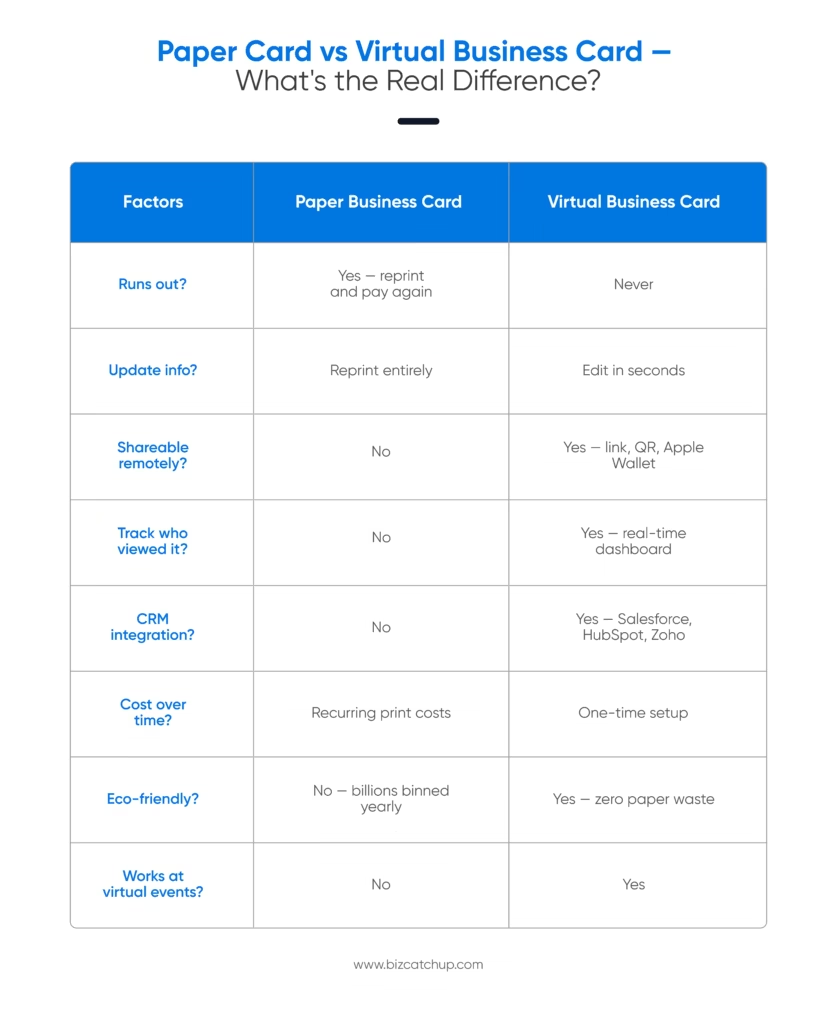
1. You Never Run Out
Running out of business cards at the worst possible moment is a real frustration. With a virtual business card app, that moment never comes. Your card lives on your phone. Share it with one person or a thousand; no reprints, no costs, no stress.
2. Your Details Are Always Up to Date
Got promoted? Changed your number? Rebranded your company? Update your digital card once, and everyone who has your link automatically sees the new version. No chasing people down. No outdated cards floating around.
3. You Can See Exactly Who Engaged With You
BizCatchup gives you a real-time dashboard that shows who viewed your card, which links they clicked, and when they engaged. This kind of visibility is something paper cards can never offer. You follow up at the right moment; not guessing, but knowing.
4. Sharing Works Everywhere, Online and Offline
In-person meeting? Open your QR code and let them scan it. Video call? Drop your link in the chat. Email? Paste it in your signature. A QR code business card works across every situation, with zero friction.
5. It Plugs Into the Tools You Already Use
BizCatchup connects with Salesforce, HubSpot, Zoho, and Slack. When someone receives your digital card, that contact can move straight into your CRM. No manual entry. No switching between apps.
6. It’s Sustainable
Billions of paper cards are printed every year. Most are thrown away within a week. Switching to a virtual business card app cuts that waste entirely, and it’s the kind of small choice your clients and contacts tend to notice.
7. It Scales Across Your Whole Team
Managing a team? BizCatchup lets you assign roles, oversee multiple digital cards, and keep your brand consistent across every employee. Whether your team is five people or five hundred, everyone shows up professionally.
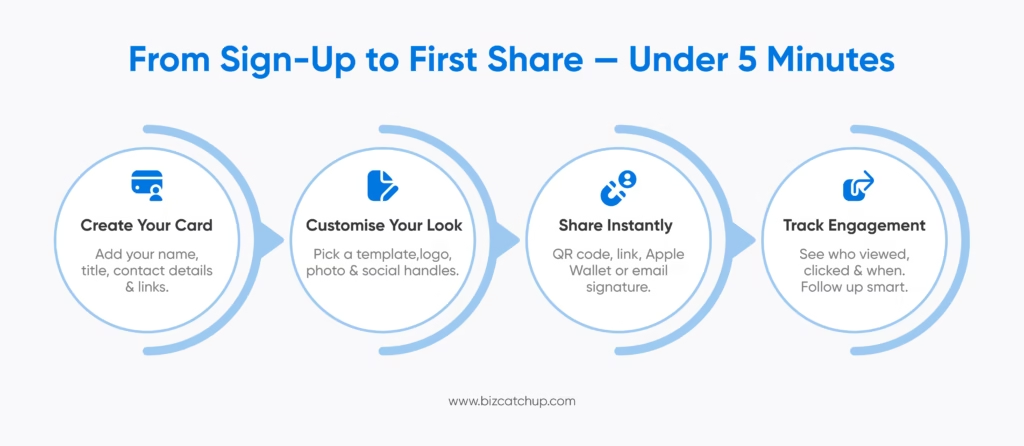
How to Set Up Your Virtual Business Card App in Under 5 Minutes
Getting started with BizCatchup is genuinely fast. Here’s how it goes:
Step 1: Build your card.
Open the app, drop in your details, and pick a design template. Nothing about this requires design skills. It takes a few minutes, not a few hours.
Step 2: Control what you share.
Add your photo, your company logo, and your social links. Then decide what’s visible to the world and what isn’t. That field-level privacy isn’t a premium feature bolted on as an afterthought; it’s built into the card from the start.
Step 3: Start sharing.
Your QR code lives in the app, ready to display on your screen whenever you need it. Drop your link into an email signature, WhatsApp, or a quick text. If you’re an iPhone user, BizCatchup works with Apple Wallet, one tap and your card is right there, no fumbling required.
Step 4: Actually use the data.
Here’s where it gets interesting. Your BizCatchup dashboard shows you who viewed your card, what they clicked, and when. Not in a creepy way, in a “now I know exactly when to follow up” way. That timing matters more than most people realise.
BizCatchup as a Contact Management App
Most consumers use a mobile app to exchange their own information via the virtual business card. The more useful aspect of BizCatchup is how it allows you to use those cards in the future.
You can take a photo of an existing paper business card, and BizCatchup will extract (read) it automatically for you and then store it as a contact. You will not need to manually input this information. You also won’t have to decipher badly printed or small-sized font or speculate if you entered a person’s email address correctly.
If you receive 40 business cards from people at a conference, you can scan all 40 at one time, and they will automatically be added to your contact list with automatic tagging, allowing you to search for them later.
You can then easily export these individuals (contact records) to your CRM or share them in CSV format or Excel format with a single click.
Who Gets the Most Out of a Virtual Business Card App?
The honest answer: anyone who meets people professionally. But some use cases stand out.
Sales professionals use BizCatchup to share their card instantly and track who’s engaging. They know exactly when to follow up, because the data tells them.
Freelancers and independent professionals use it to look sharp and credible without spending money on design or print.
Event attendees and organisers use QR code business cards to exchange contact details quickly, without the pile of paper at the end of the day.
Teams and growing companies use BizCatchup to keep their brand consistent whenever an employee makes a new connection, across every meeting, every role, every region.
The Real Cost of Sticking With Paper
Every card that gets lost is a connection that quietly disappears. Every outdated detail is a reason someone can’t reach you when they want to. Every hour spent on manual data entry is time your team isn’t spending on what actually matters.
A virtual business card app doesn’t just replace paper. It replaces the friction, the guesswork, and the gaps in your networking. BizCatchup gives you a smarter, faster, and more professional way to make every introduction count.
Create your free digital card on BizCatchup today.
FAQs
What is a virtual business card app, and how does it work?
A virtual business card app lets you create a digital version of your professional contact details and share them instantly via a QR code, a direct link, or a mobile wallet. You add your name, role, contact information, and social links inside the app. When someone scans your QR code or opens your link, your full card appears on their device, and they can save your details with one tap. BizCatchup also lets you track who views and clicks your card so you know when to follow up.
Is a virtual business card app better than a physical business card?
For most professionals today, yes. A virtual business card never gets lost, never runs out, and updates automatically the moment you change your details. Unlike a paper card, it includes clickable links, real-time engagement tracking, and integrations with tools like Salesforce and HubSpot. It also works seamlessly across in-person and virtual settings, making it far more versatile than any printed card.
Can I use BizCatchup to scan and save physical business cards?
Yes. BizCatchup includes a built-in card scanning feature. Point your camera at any paper business card, and the contact details are captured and saved automatically, no typing needed. You can also scan multiple cards in bulk, which makes it especially useful after conferences or networking events where you’ve collected a large number of cards at once.
How do I share my QR code business card with someone I just met?
Open BizCatchup and display your QR code on screen. The other person scans it with their phone camera, and your digital card opens instantly in their browser, no app download required on their end. You can also share via a direct link over WhatsApp, email, or text message. BizCatchup supports Apple Wallet as well, so you can share your card with a single tap during face-to-face meetings.
Is my information safe on a virtual business card app?
Yes. BizCatchup protects your data with end-to-end encryption and gives you full control over what’s visible on your card. You can set field-level privacy, choosing exactly which details are public and which are restricted. This means you can share your card broadly without ever exposing information you’d prefer to keep private. Your data stays secure and entirely in your control at all times.
Ready to stop losing connections over a piece of paper? Get started with BizCatchup’s virtual business card app. It’s fast and built for professionals.
