
The concept of networking is no longer what it used to be a few years back. The norms are different, the pace is faster, and the whole process of getting in touch with people has become something much more fluid, dynamic, and digital. To those who advocate for relationships, one fact is crystallizing. Conventional calling cards are no longer sufficient.
It is not the person who gives out the most cards who wins in the contemporary networking game. Winners are the ones who get into the most meaningful, efficient, and memorable exchanges. It is they who leverage technology to remain top of mind even after the initial handshake or online introduction. And that is where the digital business card app comes in.
This guide simplifies all you need to know. What are digital business card apps, why they are important, how they function, what features to consider, and how these business card tools can change the very way you interact with people. At the end, you will be able to see how a clever digital card can become your most effective networking product.
What Exactly Is a Digital Business Card App?
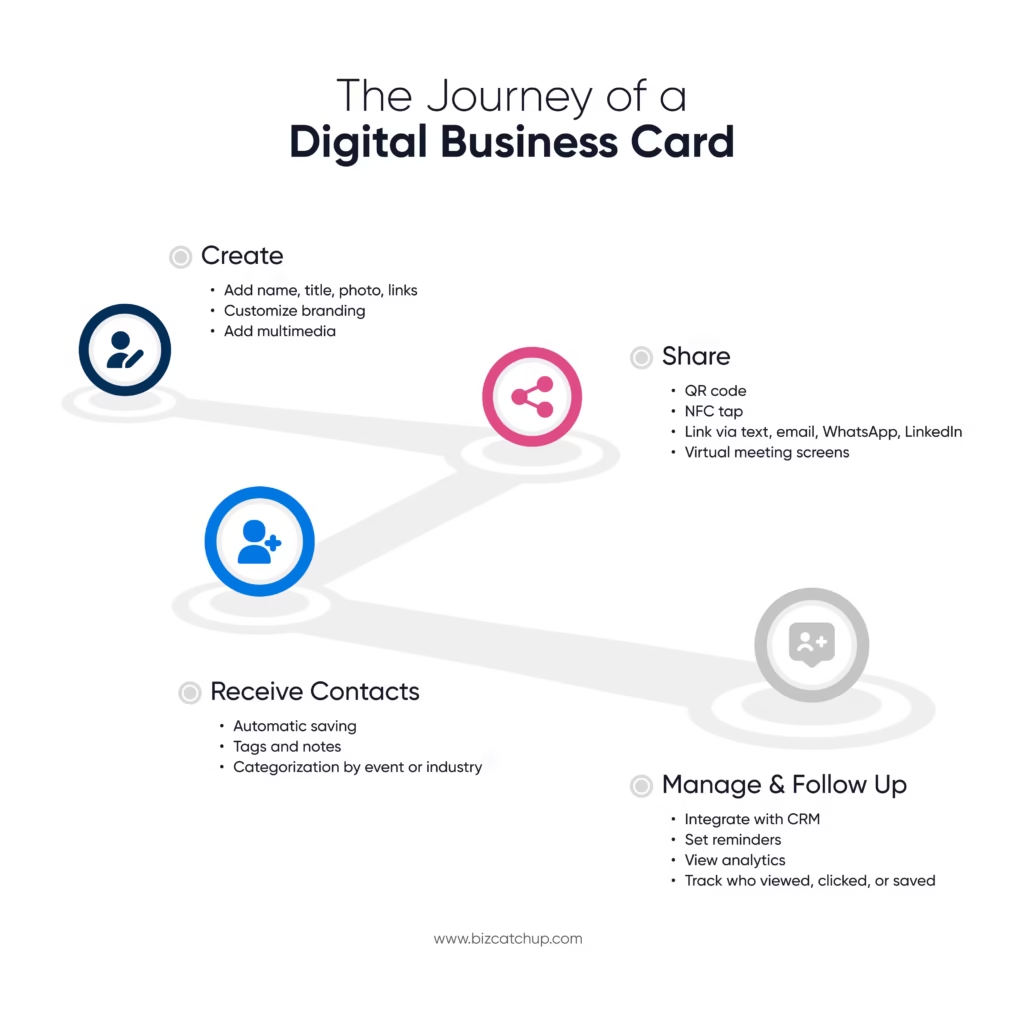
A digital business card app is one of the tools that will enable you to create, personalize, share, and manage your business identity fully online. Rather than giving a person a physical card, you make a digital one that you store on your phone and can be shared in seconds with the help of QR codes, links, NFC taps, and even virtual meeting screens.
It resembles a modern interactive profile. It shows your name, title, photo, company, social links, website, scheduling link, portfolio, and any other professional information people should keep in mind about you. A smart contactless business card, unlike a paper card, can contain videos, custom branding, forms, and live links to send an individual to your world with a single tap.
This is a straightforward change that is altering networking culture by eliminating friction. No one loses your card. Nobody loses the place where they kept it. No clutter. No reprinting. No missed opportunities.
Why Digital Business Card Apps Are Replacing Traditional Cards
Environmental Advantages
A digital business card app will generate no paper waste. No piles of printed cards lying in drawers, no discarded cards following conferences, no re-printing because of slight changes in design or role. Digital cards convey the appropriate message without uttering a single word to professionals who are concerned with sustainability.
Practical Advantages
Conventional cards require repeated printing. New job title implies reprinting. The new number signifies reprinting. A new logo means reprinting. It is costly, time-consuming, and cumbersome. A digital business card eliminates all of that. You can make updates to your information at any time, and when you do, all subsequent shares will have the most recent version.
In addition to that, your card is on your phone, so you carry it everywhere. Better still, you do not run out of cards. The networking becomes unlimited. In 2024, around 37% of small businesses and 23% of individuals were already using a digital business card app to share professional info, a number that continues to grow as networking goes digital.
Networking Advantages
One of the largest benefits of digital cards is instant sharing. You can enter your information within a few seconds, whether you are meeting someone face to face, organizing an event, a conference, or even a virtual meeting. No scrambling about finding a card and no embarrassing situations, searching pockets and bags.
Follow-ups are also augmented by digital cards. When your card is saved online, your name remains searchable in his or her phone, and your links remain open. This is much more likely to reconnect than a person who lost the paper card in his bag.
How Digital Business Card Apps Work
Creating Your Digital Card
This process is easy and user-friendly in most apps. You begin by adding your name, position, number, email, and links. Then you tailor the appearance using your brand colors, photo, or company logo.
The most distinctive feature of digital cards is the possibility of adding multimedia. Suppose we add an introductory video. Imagine connecting your portfolio, a case study, or a calendar to schedule meetings. These are the things that no paper card will ever do.
Sharing Your Digital Card
These apps shine in areas where sharing is involved.
Someone can scan your QR code. You can tap phones using NFC. You are able to send a link through text, email, WhatsApp, or LinkedIn. You can even put your QR code on your Zoom background, your event badge, your booth banner, or your email signature.
You can easily share your identity everywhere.
Receiving and Organizing Contacts
When a person re-enters the information with you, the application will save it all in a tidy manner. You are able to add tags, notes, or reminders. People can be classified on the basis of event, industry, or importance. Most apps are also connected with your email contacts or CRM.
Networking no longer appears as a tangled pile of paper slips and lost names. It is turned into a systematic, measurable, smart system.
Key Features to Look for in a Digital Business Card App
When searching or about to decide on one, ensure that the application you settle on has the following features.
1. Customizable Design and Branding
Your card must resemble you. In your voice, your brand colors, your style. The less rigid your design, the more professional you seem.
2. Multiple Sharing Options
Find QR, NFC, and URL sharing. The last thing you want to do is to use a single approach.
3. Contact Management and CRM Integration
This makes all the connections be stored and arranged automatically.
4. Analytics and Engagement Tracking
Certain applications provide information on who has seen your card, followed your links, or saved your data. Follow-ups can be significantly enhanced through this.
5. Team or Multi-User Management
In the case of organizations and event teams, this guarantees the stability of branding and allows managers to monitor performance.
6. Security and Privacy Controls
An effective application must allow you to decide who can see what information.
7. Offline Sharing Capability
Your QR code must work even in a low-network area.
8. Lead Capture and Follow-Up Tools
Forms, notes, reminders, and tags simplify and make your networking more strategic.
Some of these features are found in apps such as BizCatchUp, so they are a useful choice when connectors are concerned with design and efficiency.
Benefits of Using a Digital Business Card App
Enhanced Professional Presence
Digital cards assist you in creating a first impression. Card sharing during an event, during a meeting, or even during a casual encounter indicates that you are well organised, contemporary, and sensitive to how you project yourself.
A digital card is not simply an alternative to a paper card. It is a mini experience.
Seamless Sharing
Sharing becomes effortless. Physical exchange is not necessary. During events, you can have your QR code on your badge or table, where other people can scan it without having to interrupt their conversations.
In online circles, it is even superior. You may place your QR code in any and every significant place in your online world.
Better Follow-Up and Relationship Building
When your connections are in order, you find it easier to develop relationships. Digital cards enable you to write notes instantly. People can be tagged by occasion or circumstance. Reconnecting can be added as a reminder.
Follow-ups are even smoother when your card has links to your content or scheduling page. Individuals are able to schedule a call with you immediately.
Cost Efficiency and Scalability
It does not require printing, reprinting, updating the design, or physically. Digital cards grow with you, be you’re a one-person professional or a member of a 500-person team.
The most beneficial thing is that you can never run out of cards.
Stronger Branding and Personalization
Any story can be carried around with your identity with digital cards. You are able to include videos, portfolios, client testimonials, product links, etc. You may customize your card to various audiences, roles, and projects.
As an illustration, you can have a card about corporate clients, another card about event networking, and another card about collaborators.
Such customization makes your professional presence lively and rich.
Best Practices to Maximize Your Digital Business Card
These are the simplest steps to maximize the use of your digital business card app.
- Add a clear call to action. It may be a connection to your calendar, portfolio, or a special landing page.
- Keep your content concise. Information overload may stress people out. Share just enough to create interest.
- Check your sharing preferences in advance. Ensure that your QR code, NFC, and links run without issues.
- Use leverage analytics where possible. When the app indicates who peeped at your card, then explore the data to make a meaningful follow-up.
- Develop alternative versions. There is no universal networking. Your card must respond to every situation.
Common Mistakes to Avoid
Although digital cards are straightforward, some pitfalls can be avoided.
- Overloading your card. Having too many links, too many pictures, or too much content makes the experience overwhelming.
- Unclear branding. Ensure that your card is a manifestation of yourself. Leaving out the updating of your details. You must remember to keep your card up-to-date.
- Ignoring analytics. When individuals are conversing with your card, do not miss the follow-up.
- Using a single sharing approach. Always be prepared with QR, link, and NFC.
Conclusion
Networking is no longer about distributing piles of paper cards and wishing that people will remember you in the future. The professionals who are outstanding today are those who make connections easy. They employ tools that assist them to be memorable, organized, and easy to follow up with.
A digital business card app is not just a modern upgrade. It is a networking friend that also assists you in building stronger relationships, expressing yourself beautifully, and staying in touch with the people you care about. One of the easiest but most effective changes you can make is to switch to digital cards among relationship-driven professionals and high-contact connectors.
It is time to move to a wiser and easier-going mode of connection. Your network, your brand, and your future partnerships will be thankful.
Quick Catch
1. What is a digital business card app and how does it work for professional networking?
A digital business card app lets professionals create, share, and manage contact details digitally using QR codes, NFC, or links. It simplifies networking by enabling instant sharing, easy updates, and organized contact management.
2. Are digital business card apps better than traditional paper business cards?
Yes, a digital business card app is more efficient than paper cards because it’s eco-friendly, always accessible, instantly editable, and supports multimedia sharing, analytics, and CRM integration—features that traditional cards cannot offer.
3. How secure is a digital business card app for sharing personal and professional information?
Most digital business card apps include privacy controls, encryption, and permission-based sharing. Users can decide what information is visible, update details in real time, and revoke access, making them safer than static paper cards.
4. Can a digital business card app help with lead generation and follow-ups?
A digital business card app improves lead generation by capturing contacts automatically, tracking views and clicks, integrating with CRMs, and enabling reminders—making follow-ups faster, more personalized, and easier to manage after events or meetings.
5. Who should use a digital business card app—individuals, teams, or businesses?
A digital business card app is ideal for freelancers, sales professionals, recruiters, event teams, and enterprises. It scales easily, maintains brand consistency, and supports team management, making it useful for both individuals and organizations.
