
A study showed that over 88% of traditional business cards had been discarded in less than one week after receiving them. That one statistic is all one needs to know about the transformation of professional networking. Meetings, networking, and sharing of information still happen, but the manner in which these are communicated must be quicker, smarter, and more unforgettable.
This is where an ebusiness card comes in.
To relationship builders, independent professionals, and operational or event-based connectors, networking is not about gathering contacts. It is more constructive as recall, follow-ups, and relevancy after the initial contact. A properly designed digital business card will do just that. It transforms an ordinary sharing of information into a breathing and changing relationship.
In this guide, we take you through the process of designing a business card that is unique and really works to your benefit.
What Is an eBusiness Card and Why It Matters
An ebusiness card is an online representation of a physical business card, which can be distributed electronically via QR, links, NFC taps, email, or messaging services. It is not like calling cards, and can be edited, interactive, and expanded as your professional career expands.
It is not merely convenient, but relevant. All your contact details, social profiles, portfolio links, and even calendars can reside in a single place. By keeping your digital business card, they keep access to you and not to your name.
It is more important than ever in a world with short attention spans and delayed follow-ups.
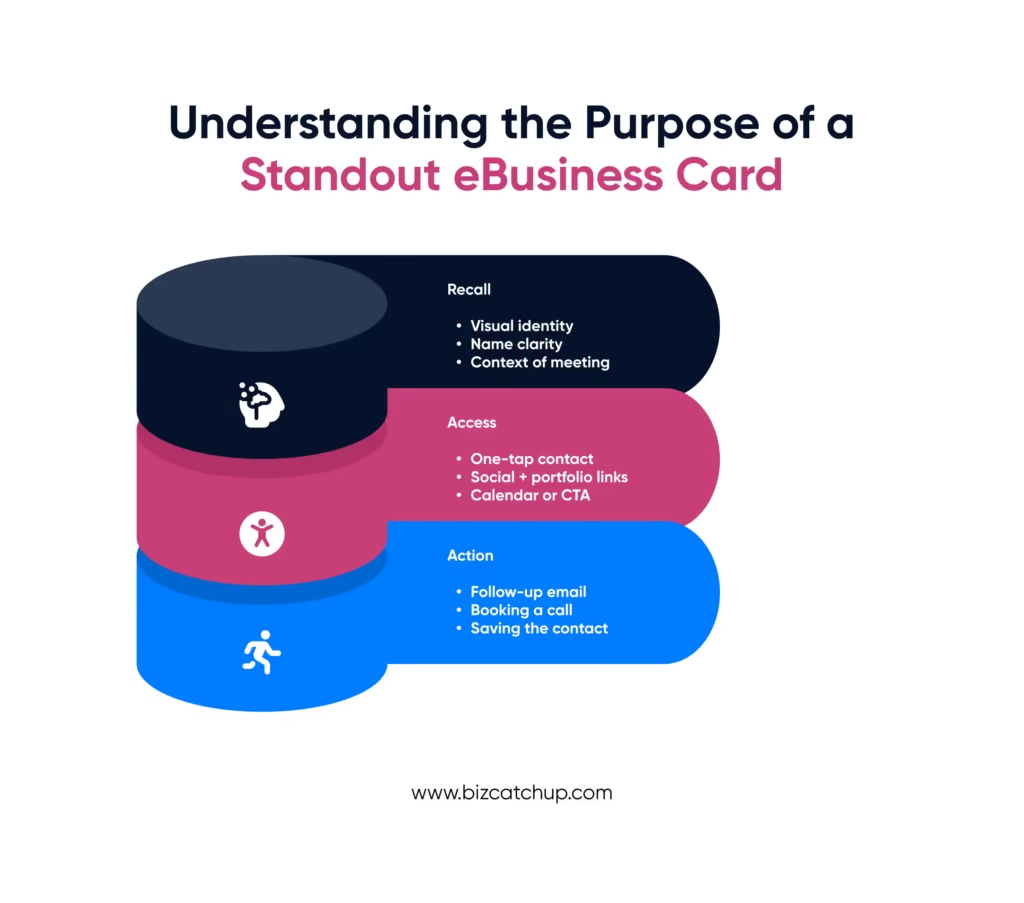
Understanding the Purpose of a Standout eBusiness Card
When you want to design anything, you need to know what your business card is intended to do.
It is not merely the digital version of paper. It is a networking tool that is meant to:
- Help people remember you
- Ensure it is easy to reach out to you in the future.
- Promote effective follow-up.
- Uphold your professional identity.
All aspects that you introduce must have at least one of these objectives.
Essential Elements Every eBusiness Card Needs
Clear and Accurate Personal Information
Start with the basics. The name, position, company or profession, and major contact information of yours must be readily available and readable. Avoid clutter. When he or she needs to look up your email or phone number, you have already lost momentum.
A Professional Visual Identity
Your logo, or photo, has a greater influence than many think. A professional and clean headshot creates trust immediately. In the case of businesses, a logo serves to strengthen brand recall. Consistency in the visuals of your ebusiness card and other websites enhances recognition.
Relevant Links That Add Value
Do not stuff too many possible links on your card. Use links that promote your career objectives.
This could include:
- Professional social or LinkedIn profiles.
- A portfolio or website.
- A booking or calendar link.
- A company page.
Each of these links should respond to a question the other may have of you.
Designing for Simplicity and Impact
The best business cards are plain ones.
Make a clean design with a sufficient space between the information to make it breathable. Use one or two brand colors. Choose readable fonts. Keep it simple without useless animations and overboard design.
Keep in mind your card will be visible on mobile screens the majority of the time. Unless it appears appealing or loads fast on a phone, it will not be utilized.
Making Your eBusiness Card Easy to Share
A smart contactless business card is of no use when it is difficult to share.
Make sure your card can be shared in different ways:
- QR code to face-to-face meetings and events.
- A very short link that supports messaging apps.
- NFC Smartphone sharing via quick tap (where possible).
The more accessible it is, the more likely it is to be stored and re-read.
Using Context to Your Advantage
Various networking scenarios require different strategies.
At events, people want speed. A quick scan or tap works best. A chat or email link is better in virtual meetings. Certain websites will help you tailor your ebusiness card to the needs of different audiences, which can enhance the relevance tremendously. Tools such as BizCatchup enable this kind of flexible, context-aware sharing without adding complexity.
Context-aware sharing is considerate and professional.
Keeping Information Dynamic and Updated
The benefit of a digital business card is that it can be updated immediately.
Have you switched your position, employer, contact number, or specialization? Edit it once, and your card is shared with all those who have it. This makes sure that you do not miss opportunities because of old information.
It also implies that your card becomes more versatile as you advance in your career instead of being obsolete.
Privacy and Control Matter
A good contactless business card provides you with control over what and when to be seen.
You might want to display some information publicly yet maintain some of it privately. Some tools enable you to switch on or off visibility or establish various sharing modes. It is particularly helpful with consultants, freelancers, and connectors who act in more than one role.
Trust is created when information is not too forceful.
Measuring Engagement and Improving Over Time
In contrast to paper cards, ebusiness cards can provide insights.
You can also monitor the frequency of your card being viewed, what links are being clicked through, and how individuals interact with it. These can guide you to improve on what you post and the way you appear.
When one link is overlooked, and another one is clicked, you know what your audience appreciates.
Why Professionals Are Shifting Away From Paper Cards
The move towards paperless is not solely about sustainability, but that is a significant point. It deals with effectiveness, simplicity, and continuity.
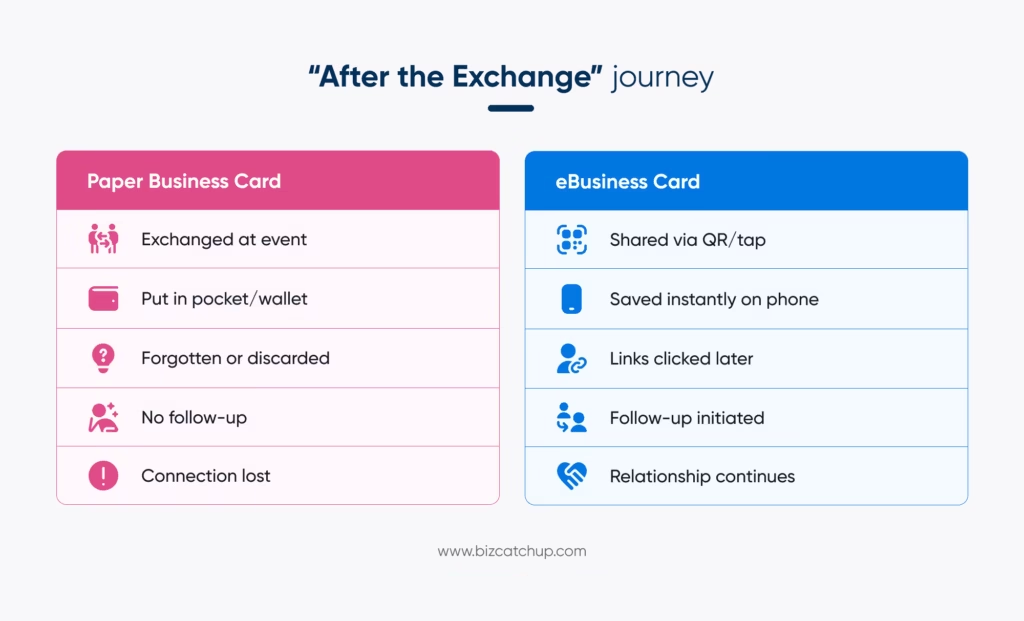
Paper cards capture your identity at a certain moment. An ebusiness card grows with you. It helps in continuing discussions and not terminating at the exchange.
This evolution is not a choice for people whose success relies on relationships. It is necessary.
Final Thoughts
Designing a unique digital business card does not involve glitter and gold. It is concerned with clarity, usefulness, and relevance.
Your digital business card will serve as the key to first contact and long-term connection when properly done. It makes people remember you, contact you, and interact with you once more.
In contemporary networking, it is not simply about being visible. It should be remembered and pursued. An intelligently designed business card does just that.
When you make it an extension of your professional self, long after the initial meeting, it will be working in your favor.
Quick Catch
1. What is an eBusiness Card and how does it work?
An eBusiness card is a digital version of a traditional business card that shares contact details through links, QR codes, or NFC. It allows instant saving, easy updates, and interactive engagement across devices.
2. How do I create an eBusiness Card that stands out professionally?
To create a standout eBusiness card, focus on clean design, clear branding, professional visuals, interactive links, and a strong call to action. Personalization and mobile-friendly layouts significantly improve memorability and engagement.
3. What should I include on an eBusiness Card for networking events?
An effective eBusiness card should include your name, role, contact details, social profiles, website, and a clear action like booking a meeting. Optional additions include a photo, portfolio link, or short intro video.
4. Are eBusiness Cards better than traditional business cards?
Yes, eBusiness cards offer advantages like instant sharing, real-time updates, analytics tracking, and eco-friendliness. Unlike paper cards, they reduce waste and improve follow-ups, making them ideal for modern professional networking.
5. Can eBusiness Cards help build stronger professional relationships?
eBusiness cards help build stronger relationships by enabling richer interactions, easy follow-ups, and consistent branding. Interactive features and accessibility ensure your information stays relevant and memorable long after the first exchange.
