

Networking usually occurs outside your CRM. Business cards are shared during events, conferences, sales meetings, and introductions—but the real work starts after the interaction. Those contacts have to be manually entered into the CRM by someone and assigned to the appropriate pipeline, and followed up on.
It is that disconnect between the capture of a contact and the conversion of that capture into a CRM lead that good opportunities can be missed.
The recent update by BizCatchup deals with this challenge directly.
Under the new Salesforce Integration, BizCatchup can now be used to send captured contacts right to Salesforce so that networking interactions become a structured CRM lead without requiring manual data entry.
This would make the process between the business card and the pipeline smoother for sales teams, founders, and business development professionals.
We will take a look at what this new feature is and why it is important.
Why CRM Integration Matters for Modern Networking
Companies such as Salesforce have become hubs for contemporary sales platforms. They follow up prospects, pipeline management, and documentation, and assist teams with follow-ups.
Yet, most of the contact data that drives these systems continues to be external to the CRM.
Examples include:
- Business cards gathered during conferences
- Contacts during meetings
- Networking introductions
- Event lead capture
These contacts may be forgotten or postponed in the sales process when not filled in the CRM on time.
CRM integrations resolve this issue by automatically aligning data across tools so that teams can always have access to the most updated data across systems.
The Salesforce integration at BizCatchup is made to fill that gap between pipeline and networking.
Introducing Salesforce Integration on BizCatchup
The new BizCatchup Salesforce integration will allow users to direct captured contacts to Salesforce.
Contacts gathered with BizCatchup can now be pushed into Salesforce in structured records rather than manually copying the information placed on business cards into a CRM.
This integration aids the standard CRM processes that include:
- Creating new leads
- Creating new contacts
- Delegating ownership to the respective staff
- Keeping organized contact files of sales teams
Many digital card platforms already employ similar workflows to update contacts to CRM systems, to make sure networking interactions are automatically captured in the sales pipeline.
Using BizCatchup, this feature is built into the networking experience itself.
How the Integration Works
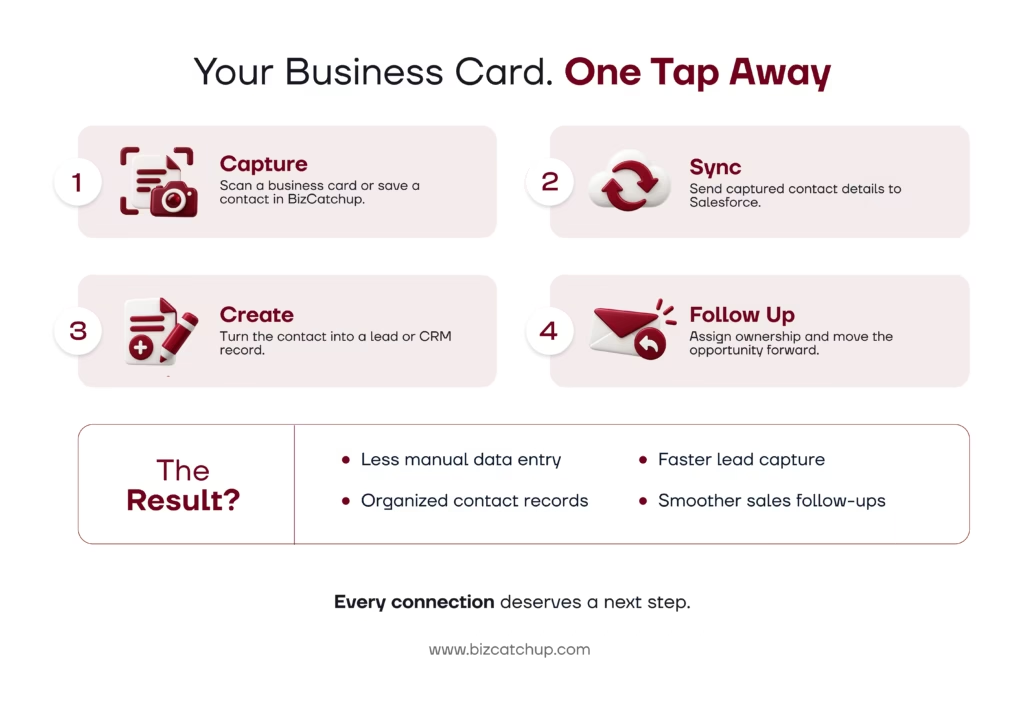
The Salesforce integration will be easy and convenient for the sales teams, who can capture contacts on a regular basis.
1. Capture the Contact
BizCatchup allows users to gather contact data whenever they scan business cards, receive digital cards, or save the information manually.
The contact is added to the BizCatchup network of the user.
2. Sync to Salesforce
With Salesforce integration turned on, the user can push the contact directly to the Salesforce environment.
This will do away with the manual re-entry of information like:
- Name
- Job title
- Company
- Phone number
- Email address
It is often automated by business card scanning tools that will read contact details and send them directly into CRM systems such as Salesforce.
3. Create a CRM Record
After syncing, the contact will be available in Salesforce in the form of:
- A lead, or
- A contact within an existing account.
This means that the new connection is immediately added to the sales workflow.
4. Assign Ownership and Follow Up
Sales teams are able to assign the contact to the right team member, record the activities, and move the lead through the pipeline.
The connection will no longer be in a notebook or phone contact list; it is now contained within the CRM system of the organization.
Key Benefits of the Salesforce Integration
The new feature provides a number of benefits to businesses that make a lot of use of networking and relationship building.
Faster Lead Capture
The biggest benefit is speed.
Gathered contacts at a meeting or event can be added to Salesforce virtually in real time, assisting teams to take action when the event is still fresh.
Reduced Manual Data Entry
One of the most prevalent areas of friction when using CRM is manual contact entry.
BizCatchup assists in this process through automation of repetitive work and errors.
Centralized Lead Management
When contacts get into Salesforce, they are integrated into the structured lead database of the company.
This allows teams to:
- Track follow-ups
- Monitor deal progress
- Control the history of communication
Improved Sales Team Collaboration
CRM systems enable the sharing of leads between teams.
Team members will be able to see new relationships and organize outreach more efficiently when contacts are automatically synchronized with Salesforce.
Stronger Networking ROI
Networking practices are quantifiable and are one of the biggest drivers of positive ROI.
All scanned or digital cards distributed in business can be fed directly into the sales pipeline, and it is now easier to trace the role of networking in business development.
Real-World Use Cases
The Salesforce integration is especially helpful to those who retrieve high numbers of contacts.
Event Networking
Contacts at conferences/trade shows can be scanned into BizCatchup and automatically matched on Salesforce to follow-up campaigns.
Turning Networking into a Sales Workflow with Salesforce Integration
Networking often creates valuable business connections, but turning those connections into sales opportunities can be challenging. When contact management and sales activities happen across separate tools, teams may have to enter information manually, increasing the risk of missed details and delayed follow-ups.
Salesforce integration with BizCatchup helps bridge this gap by connecting networking activities with your CRM workflow. Instead of treating a new connection as an isolated interaction, businesses can make it part of a more organised approach to lead management and sales follow-ups.
The process can follow a simple flow:
Business Card → BizCatchup → Salesforce CRM → Sales Pipeline
This approach helps teams move from exchanging contact details to managing potential business opportunities within their sales process. With the right integration setup, it can also reduce repetitive data entry and make it easier for sales teams to organise their contacts and follow-up activities.
The result is a more connected workflow where networking can become the starting point for building customer relationships and developing sales opportunities.
Conclusion
The new Salesforce Integration in BizCatchup will eliminate friction between networking and CRM management.
With the ability of BizCatchup to capture contacts in Salesforce, businesses can be confident that valuable contacts are immediately converted into leads to be pursued.
To sales teams, founders, and professionals whose growth is based on building relationships, this feature will make sure that all conversations have a clear route into the sales pipeline.
And as BizCatchup keeps developing, integrations of this nature will bring networking a lot closer to what a modern business actually requires: a smooth linkage between relations and income.
Quick Catch
1. What is the BizCatchup Salesforce integration?
The BizCatchup Salesforce integration allows users to send captured contacts directly to Salesforce, turning networking interactions into structured CRM leads instantly.
2. How does BizCatchup help reduce manual data entry?
BizCatchup automatically syncs captured contact details to Salesforce, eliminating the need to manually enter business card or networking information.
3. Who can benefit from the BizCatchup Salesforce integration?
Sales teams, founders, and business development professionals who regularly network and manage leads can benefit from faster contact-to-pipeline workflows.
4. Can contacts captured at events be added to Salesforce?
Yes, contacts collected during events, meetings, or introductions can be synced directly to Salesforce for immediate follow-up.
5. Why is Salesforce integration important for networking?
It ensures valuable contacts don’t get lost and helps teams convert networking interactions into actionable sales opportunities quickly.
