
The market for digital business cards is expected to grow from $181.46 billion in 2024 to $518.35 billion by 2035, with a 10% annual increase, as professionals globally stop using paper business cards and switch to smarter ways to build business connections.
This move is not just a trend. It represents a shift in the way we create, maintain and track our professional networks.
eBusiness cards are digital versions of traditional cards and remove the restrictions of using paper. They provide features that change the way we network by allowing us to make updates in real-time, measure engagement, include rich multimedia, and connect seamlessly with CRM systems
In this eBusiness card guide, we’ll introduce what eBusiness cards are, how they work, who gets the most out of them, and why early adopters of eBusiness cards have a measurable edge over those who still use paper ones.
What Are eBusiness Cards?
A digital business card is a modern version of a regular business card that lives on your smartphone instead of your wallet. Instead of giving someone a physical card, you can provide your contact information instantly through a QR Code, NFC tap, or link.
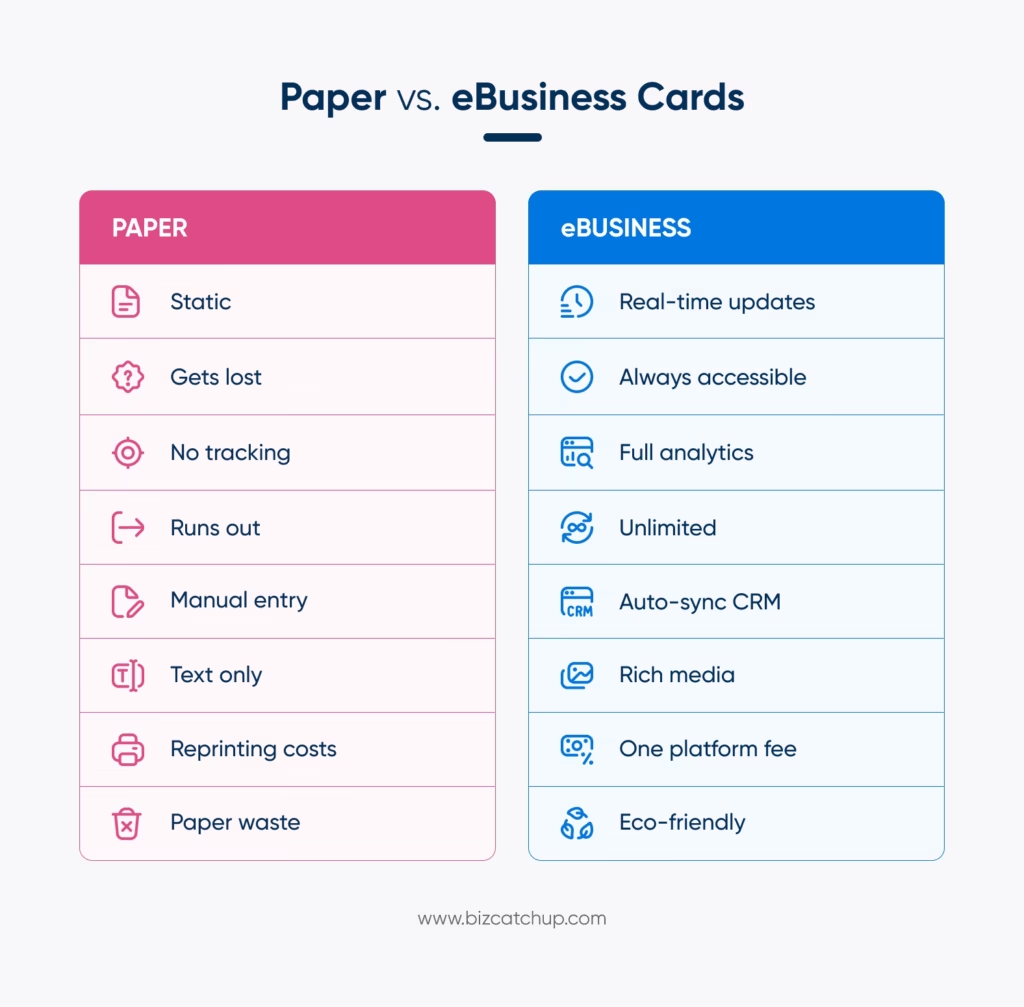
Unlike paper cards that become obsolete once you change jobs or phone numbers, eBusiness cards update in real time. Change your information once, and everyone in your business connections network sees the updates automatically—no reprints, no outdated cards floating around.
How They Work:
Your digital business card has your contact information, links to social profiles, and a portfolio. When you network with other people, they can scan a QR code from your card or go through a Near Field Communication (NFC) process on their phone to save your entire professional information directly into their contact list—no typing, no lost cards, and no mistakes.
The Key Difference:
Traditional paper business cards are limited and unchanging. eBusiness card technology lets you create a dynamic card that can be tracked as well as includes additional types of media, such as video, booking links, testimonials, and current portfolio information. You aren’t just exchanging contact information—by using an eBusiness card, you are exchanging your entire professional image.
Key Features of Modern eBusiness Cards
Instant Contact Sharing
With just a scan or tap, share your name, phone, email, socials, and website—building business connections instantly. The person receiving your information will have it saved directly into their phone’s contact list within seconds.
This means there are no more typing mistakes that cause someone to enter “[email protected]” instead of “[email protected]” and wonder why the email bounced back.
Real-Time Updates
Changed jobs? Got promoted? Newly updated your portfolio? Edit your entire smart business card once, and anyone who has it will see your changes at the same time. No more boxes of outdated business cards in your office, or that awkward moment of handing someone a card with your old job title crossed out.
Rich Media Integration
You can embed your portfolio, demo videos, client testimonials, or a calendar link to book appointments directly into your eBusiness card. A graphic designer can use first-person video to show their current work, a consultant can link to a case study, and a coach can include a “book an appointment” button.
Example: A real estate agent’s eBusiness card contains a virtual tour video of his latest listing, three client testimonials, and a Calendly link for property viewings. When prospects connect via QR code scan, they access everything instantly—no website visit required.
Analytics and Tracking
You can see who has viewed your card, when they viewed it, and which of the hyperlinks you have included in it were clicked. If three employees of a single company review your information after an event, that represents a strong lead that should be followed up on immediately.
Customization and Branding
You can use your company’s colours and branding or create a unique personal brand style to use on your eBusiness cards. Your sales team can have an overall consistent look by using your company’s branding, but they can add their own personality to the eBusiness cards.
Environmental Benefits
The average person will receive over 200 business cards each year. Receiving these business cards comes at the cost of paper, ink, shipping, and ultimately the wasteful disposal of these cards. One eBusiness card replaces all of them indefinitely while signaling you build business connections sustainably.
Benefits of eBusiness Cards for Different Professionals
For Companies and Teams
Need to onboard 10 new sales reps? eBusiness cards are instant, professional, and brand-aligned, without wasting paper and losing count. A centralized contact management prevents 3 of your team from accidentally contacting the same prospect.
Cost reality: A 50-person team spending $200/person annually on paper cards = $10,000. One eBusiness card platform costs a fraction with infinitely more functionality.
For Freelancers and Solopreneurs
Your services are always evolving. Update your eBusiness card instantly rather than throwing out 500 printed cards! Show your portfolio directly. Photographers can link to the most recent shoots, copywriters can embed writing samples, and videographers can include a demo reel.
Bonus: A prospect who receives your card after an 11 PM virtual event will be able to schedule a discovery call by using the link to your Calendly while it is still fresh in their mind.
For Consultants
Have you just received your certificate? Got a glowing testimonial? Put it on your card today! Create different card versions for strategic business connections: financial expertise for CFOs, operations experience for COOs.
For Remote Workers
You can share your eBusiness card using the chat function on Zoom or via LinkedIn without delay—no need to say “I’ll send you my card in the mail.” Your card is available to anyone, anywhere, at any time.
How eBusiness Cards Integrate with CRMs and Platforms
CRM Integration Benefits
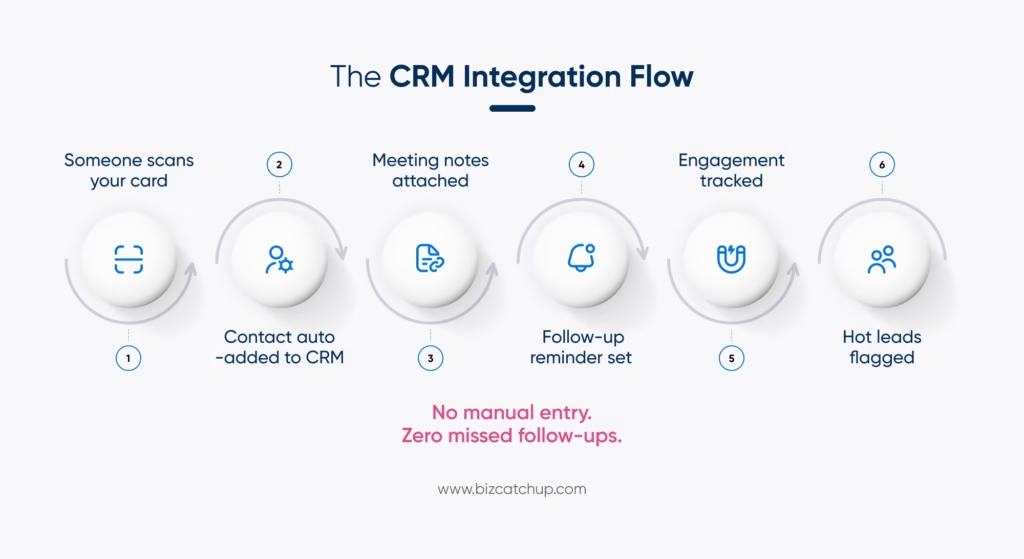
Modern eBusiness cards come from digital business card apps that sync automatically with your CRM. For example, when someone scans your card at an event, their information will be added to your Salesforce or HubSpot pipeline along with notes on your meeting, as well as follow-up reminders automatically generated for you.
Engagement data can also be tracked back to your CRM. If a prospect views your business card three times within one week, your CRM will flag that person as a “hot lead”.
Popular Integrations:
Leading platforms connect with:
- CRMs: Salesforce, HubSpot, Pipedrive, Zoho
- Contacts: Google Contacts, Apple Contacts, Outlook
- Email Marketing: Mailchimp, ActiveCampaign, Constant Contact
- Scheduling: Calendly, Google Calendar, Microsoft Bookings
Social Platform Integration
You should include your LinkedIn, Twitter, Instagram and portfolio links. When making business connections, one scan gives prospects access to your entire professional ecosystem—not just an email address.
For example, BizCatchup integrates with all of the major CRMs and social platforms so that every connection is immediately added to your workflow—no need to manually enter any data, and there are no missed follow-ups!
Popular eBusiness Card Sharing Methods
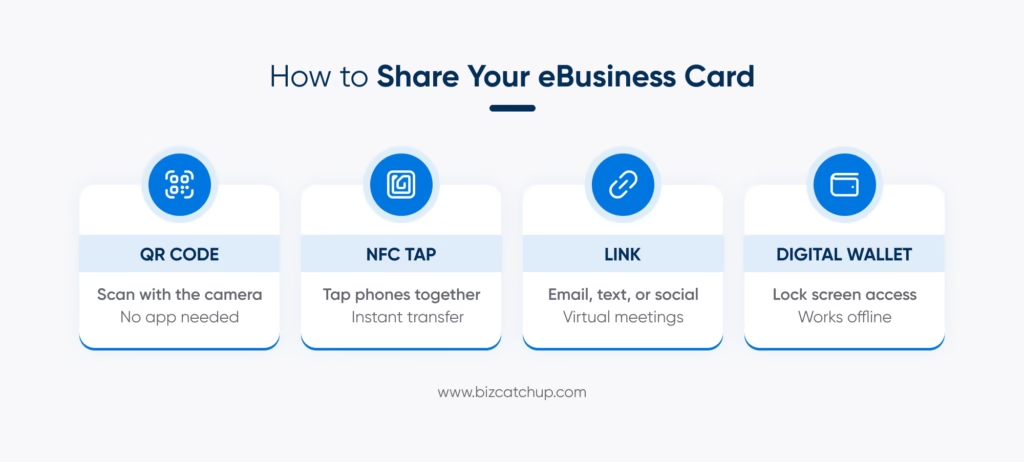
QR Code Scanning
The most common way is to display the QR code on your mobile device(s), business card, or printed material. Anyone with a smartphone camera can instantly scan without the need for downloading any application.
NFC Tap Technology
With an NFC-enabled card, you can also utilize a physical tap-to-share method by holding your phone next to another person’s phone or card, transmitting your contacts to them instantly. This method works with both iPhones and Androids, providing a premium atmosphere for face-to-face connection.
Link Sharing
You can copy and paste your eBusiness card link anywhere: email signature, text message, LinkedIn profile, Instagram profile, and many others. Great way to network when not able to meet in person.
Digital Wallets
Save your eBusiness card to Apple Wallet or Google Pay for offline access. One tap from your lock screen creates business connections instantly—no unlocking your phone or opening apps required.
For example, at conferences, you can scan QR codes. In virtual meetings, you can drop your eBusiness card link in chat. Impress VIP contacts by using the NFC tap method. With one card, you can share in multiple ways.
Choosing the Right eBusiness Card Platform
What to Look For:
Easy to Use: Minimal setup time with a simple, intuitive UI. You shouldn’t require any additional training.
Customization: You can customize the design to match your brand, including colours, logos and font type. You can also create multiple versions of your card for different types of audiences.
Analytics: You should be able to know who has viewed your card, when they viewed it and what links they clicked on. Follow up with data, not guesswork.
Integration: You are able to easily integrate your CRM, email marketing tools, and calendar applications.
Team Features: f your team builds business connections together, check to see if they have shared databases, admin controls and integrated billing.
Red Flags to Avoid
Lack of customization, no analytical tools, poor mobile performance, limited third-party integration, and costs hidden in small print.
Platforms like BizCatchup contain all of the basic features: easy-to-use UI, excellent analytics, CRM integrations, team collaboration tools, and clear pricing. Suitable for solo professionals and large companies alike, they all provide similar functionality, no matter the size of the user.
The Future of Professional Networking
The move to digital continues to grow. The global QR code market is expected to be $1.45 billion by 2033, reflecting growing demand for contactless, instant information sharing
The generational change has accelerated this demand; Generation Z and Millennials expect to interact with each other using contactless and mobile-first methods. Due to sustainability mandates, businesses are being pushed away from creating paper waste. With remote and hybrid work, exchanging physical cards has become even less relevant.
New technologies will continue to expand the abilities of eBusiness cards: artificial intelligence-powered networking recommendations, virtual reality business environments and automated relationship management systems. eBusiness cards aren’t just replacing paper—they’re becoming the foundation for how professionals build business connections and establish digital identity.
In addition to these growing numbers, those who have adopted digital cards early were able to create a competitive advantage. eBusiness cards are unique, contemporary and statistically more successful at turning connections into opportunities.
Final Thoughts
Digital business cards are no longer simply a trend. They represent the future of professional networking and provide a variety of measurable advantages compared to paper cards, including instant updates, engagement tracking, rich media inclusion, and simple integration with CRM systems.
Whether you are a freelancer, a consultant, or a member of an enterprise team, digital business cards help you create, follow up, and turn your relationships into opportunities in a consistent manner.
Start off simply and grow as necessary; try using a platform such as BizCatchup to see how much easier it is to manage and grow your professional network digitally.
What is an eBusiness card, and how does it work?
A digital business card is a mobile-first solution that lets you share your professional details instantly using QR codes, NFC taps, or a shareable link. With advanced features like card linking for business, platforms like BizCatchup allow you to connect your contact details, social profiles, portfolio, and booking links in one place, making networking seamless and efficient.
Are eBusiness cards better than traditional paper business cards?
Yes, digital business cards outperform paper cards in every way. They offer real-time updates, analytics, CRM integration, and multimedia capabilities. Unlike static paper cards, a smart business card or NFC business card ensures your information is always current and helps track engagement, making your networking efforts measurable and scalable.
How do I share my eBusiness card with someone?
You can share your digital business card using multiple methods:
a. QR code business card scan
b. NFC tap (contactless sharing)
c. Direct link (email, WhatsApp, LinkedIn)
d. Apple Wallet or Google Wallet
These options make card linking for business highly flexible, whether you’re networking at events, meetings, or online.
Can eBusiness cards integrate with my CRM system?
Yes, most digital business card apps like BizCatchup offer seamless CRM integration with platforms like Salesforce, HubSpot, Zoho, and Pipedrive. When someone accesses your card, their details can automatically sync into your CRM, helping you manage leads, track engagement, and automate follow-ups efficiently.
What is the best digital business card app for teams and enterprises?
Look for shared contact databases, admin controls, and CRM integrations. BizCatchup offers team collaboration features, real-time analytics, and customizable branding, allowing teams to build business connections efficiently without duplicate outreach, lost opportunities, or coordination issues.
What is card linking for business, and why is it important?
Card linking for business refers to the ability to connect your digital business card with multiple platforms, such as your website, social media profiles, CRM systems, booking tools, and portfolios. This creates a centralized networking hub where one tap or scan gives access to your complete professional identity, boosting conversions and improving follow-up efficiency.
