

Business cards are still exchanged at many types of events and venues, regardless of the popularity of other networking options (e.g., LinkedIn, QR Code) available online and on the internet (e.g., scanning a business card). In addition to continuing to be one of the fastest, most widely used methods of sharing one’s professional details, the business card still exists in the evolving world of digital networking. Given the increasing digitization of the networking world, BizCatchup helps link the physical business card with modern methods of managing contacts digitally.
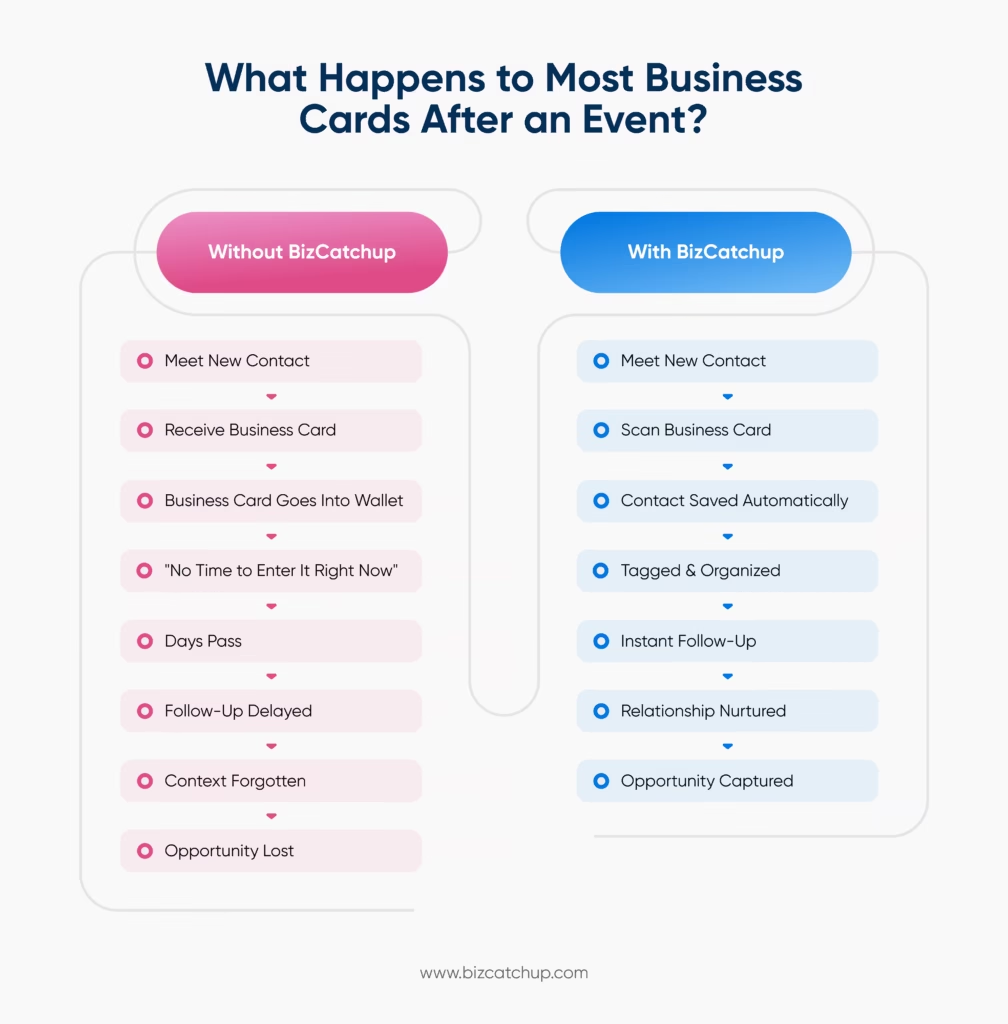
Once you exchange business cards and leave the conference, the real work begins. The typical business professional receives more than enough business cards at these types of events than they know how to care for; the majority would then collect their business cards in their purse or store them in a notebook, desk drawer, or bag and plan to get organization later. By the time they have organized their cards, all of the contextual details and related memory of the conversation with that person will often have already been lost. This can cause an inability to remember the person’s name and delays in follow-up, creating a potential lost opportunity.
As a result, increasing numbers of professionals have begun to seek out efficient solutions for converting business cards to contact records for digitally storing, searching and managing their contacts. This way, instead of having to enter the contact information into your phone, an Excel spreadsheet, or some other location, you can have the information saved in one central location on your computer.
Why Businesses Are Moving From Physical Cards to Digital Contact Management
For many years, establishing connections with other businesses has usually occurred in a traditional way where business cards were exchanged and stored via physical means such as cardholders or filing systems, providing individuals the ability to return to physical cards as needed to establish a connection. When there were fewer professionals making connections within their business, this was a method for managing contact lists; now that professionals have made dozens, and in some cases, hundreds of NEW connections per year, professionally managing relationships with contacts has become increasingly challenging for companies and organizations!
Business cards are a viable tool for creating business connections. In some industries, business cards are still a significant part of doing business, however; as companies and organizations operate differently today then most did 10+ years ago, it is important to recognize that the physical business card itself is not designed to support companies or organizations as they operationally do today. Physical business cards cannot be readily searchable or segmentable, cannot sync with other tools used in the overall operation of the organization, and cannot be easily shared by many users for use in making a connection. Additionally, larger companies/organizations that have grown their databases of contacts have found that they are storing more.
How Business Card Conversion Works
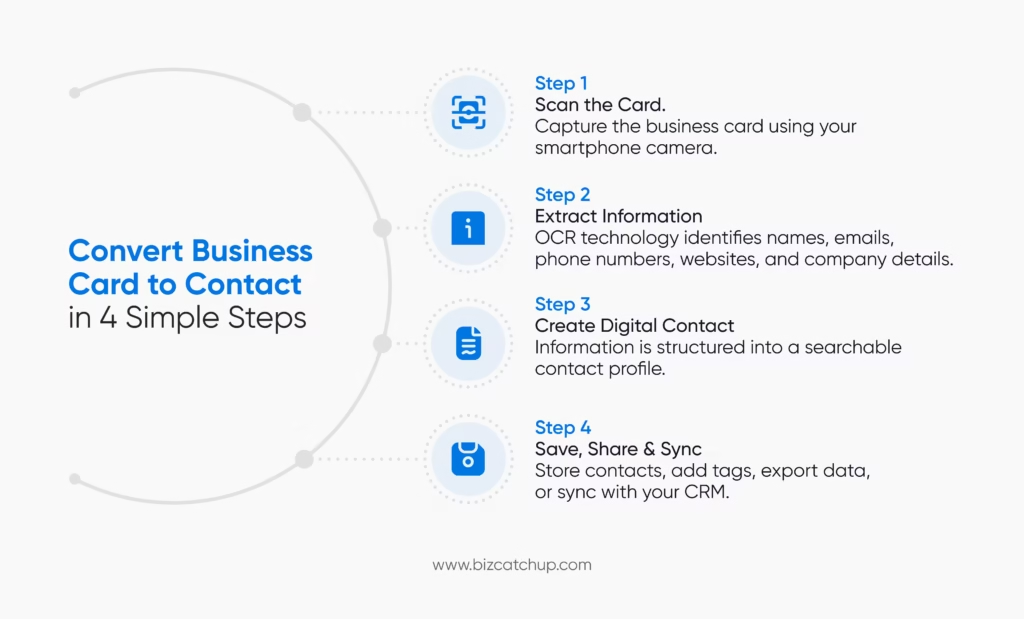
Although the technology behind modern business card scanners is sophisticated, the process itself is remarkably simple from the user’s perspective. What once required several minutes of manual data entry can now be completed in a matter of seconds.
When a user scans a business card using a business card scanning application, the software captures an image of the card and analyzes the information printed on it. Using Optical Character Recognition (OCR) technology, the system identifies text elements such as names, phone numbers, email addresses, company names, job titles, websites, and addresses. Advanced solutions often use artificial intelligence to further improve accuracy by recognizing common business card formats and organizing information into the appropriate fields automatically.
Once the information has been extracted, the system creates a digital contact profile. Instead of appearing as a simple image, the business card becomes structured data that can be searched, edited, categorized, and synchronized with other business tools.
This distinction is important. Simply storing a photograph of a business card does little to improve contact management. The real value comes from transforming that information into usable contact data that can be integrated into existing workflows.
For example, after a user converts a business card to contact information, they may choose to:
- Save the contact directly to their phone
- Add the contact to a CRM platform
- Assign tags for future segmentation
- Group contacts by event or industry
- Export records to spreadsheets
- Share contacts with team members
- Track interactions and relationship history
This ability to move seamlessly from physical information to actionable digital data is what makes business card conversion so valuable for modern professionals.
Rather than spending time on repetitive administrative tasks, teams can focus their energy on what actually drives results: building relationships, nurturing opportunities, and maintaining meaningful connections with the people they meet.
The Hidden Costs of Manual Contact Entry
Most professionals underestimate how much time they spend managing contact information.
At first glance, manually entering details from a business card doesn’t seem like a significant task. It may take only a minute or two to save a name, phone number, company, and email address. However, when this process is repeated across dozens or even hundreds of contacts over the course of a year, the administrative burden becomes much more apparent.
More importantly, the cost of manual contact entry isn’t limited to time alone.
One of the biggest challenges is inconsistency. Some contacts are entered immediately, while others are postponed. Important details from conversations are often forgotten before they can be recorded. A business card collected at a networking event may eventually make its way into a CRM, but the context surrounding that interaction rarely survives the delay.
This creates a gap between collecting contacts and actually using them.
For sales professionals, delayed data entry can result in slower lead follow-ups. For founders and business owners, it can mean missed partnership opportunities. For consultants and freelancers, it can lead to valuable relationships slipping out of view simply because they were never properly organized.
Accuracy is another concern. Even the most detail-oriented professionals make occasional mistakes when entering information manually. A single typo in an email address or phone number can make future communication difficult. When contacts are entered at scale, these errors become increasingly common.
There is also the issue of accessibility. Physical business cards can only exist in one place at a time. They cannot be searched instantly, shared with colleagues, integrated into business systems, or segmented for future outreach. As networks grow larger, these limitations become more difficult to ignore.
By choosing to convert business card to contact records digitally, professionals eliminate many of these challenges. Contact information becomes available immediately, data remains consistent, and follow-up activities can begin while conversations are still fresh in everyone’s minds.
The result is not simply a more organized contact list. It is a more efficient process for building and maintaining professional relationships.
Key Benefits of Converting Business Cards to Digital Contacts
The decision to digitize business cards is often driven by convenience, but the long-term benefits extend much further. For professionals who regularly network, attend events, or manage client relationships, converting physical cards into digital contacts can significantly improve how information is stored, accessed, and utilized.
Faster Follow-Ups
Successful networking is often determined by what happens after the initial conversation.
A prospect who expressed interest in your services today is far more likely to engage than someone contacted several weeks later. When contact information is captured instantly, professionals can send follow-up emails, schedule meetings, or connect on professional platforms without unnecessary delays.
This speed helps preserve the momentum created during the original interaction and increases the likelihood of meaningful engagement.
Better Organization
As professional networks expand, organisations become increasingly important.
Digital contacts can be categorised using tags, labels, notes, and custom groups. Instead of searching through stacks of business cards, users can quickly locate contacts based on industry, event, company, location, or relationship type.
This level of organisation becomes particularly valuable for sales teams, recruiters, consultants, and business development professionals who manage large volumes of contacts.
Improved Searchability
Finding a specific business card in a physical collection can be frustrating, especially months after receiving it.
Digital contact management systems make this process significantly easier. Users can search by name, company, email address, industry, or custom tags and locate information within seconds.
The larger a professional network becomes, the more valuable this capability becomes.
Stronger Relationship Management
Networking is not about collecting the highest number of contacts. It is about maintaining relationships over time.
When contact information is digitized, professionals can attach notes, record meeting details, track interactions, and create reminders for future follow-ups. This additional context helps transform a simple contact record into a meaningful relationship history.
Over time, this can improve communication quality and strengthen professional connections.
Easier CRM Integration
For businesses that rely on customer relationship management platforms, manual data entry often creates bottlenecks.
Modern business card scanning solutions can automatically transfer contact information into CRM systems, reducing duplicate work and improving data consistency. Instead of entering the same information multiple times, teams can move new contacts directly into existing workflows.
This not only saves time but also helps ensure that valuable leads are captured and managed properly from the beginning.
Reduced Risk of Lost Information
Physical business cards are surprisingly easy to lose.
They can be misplaced during travel, damaged over time, or forgotten entirely. Once digitized, contact information becomes securely stored and significantly easier to access across devices.
For professionals who depend on their network, this added reliability can be invaluable.
Ultimately, the ability to convert a business card to contact records is about much more than eliminating paperwork. It is about creating a system that makes professional relationships easier to maintain, easier to organize, and easier to grow.
Who Benefits Most From Business Card Scanning and Contact Management Tools?
While almost every professional exchanges contact information at some point, the value of converting business cards into digital contacts becomes even more apparent for individuals and teams that rely heavily on networking, relationship-building, and business development.
The more connections a person manages, the more difficult it becomes to rely on manual processes. What may feel manageable with ten contacts quickly becomes overwhelming when that number grows into hundreds or thousands. This is why business card scanning and digital contact management tools have become essential across a wide range of professions.
Sales Professionals and Business Development Teams
Few roles depend on relationship management as heavily as sales.
Whether attending trade shows, client meetings, industry conferences, or networking events, sales professionals are constantly meeting potential customers and decision-makers. Every business card collected represents a potential opportunity, but only if it is captured, organized, and acted upon effectively.
When teams can instantly convert business card to contact records, they eliminate delays between meeting a prospect and beginning the follow-up process. Contacts can be categorized by industry, company size, event, territory, or stage in the sales cycle, making it easier to prioritize outreach and maintain momentum.
For business development teams, this creates a more structured pipeline and reduces the likelihood of valuable leads being forgotten or misplaced.
Entrepreneurs and Startup Founders
Building a company often means building a network at the same time.
Founders regularly meet investors, advisors, potential customers, strategic partners, vendors, and industry peers. These relationships frequently develop over months or even years, making it important to maintain accurate records of every interaction.
A founder may meet hundreds of people throughout the course of fundraising, customer acquisition, and business growth initiatives. Without a reliable contact management system, keeping track of those relationships becomes increasingly difficult.
By digitizing business cards immediately, founders can ensure that every connection becomes part of an organized and searchable network rather than another card sitting in a drawer.
Consultants and Freelancers
Independent professionals often depend on referrals and repeat business to sustain growth.
Every networking event, client meeting, industry seminar, or professional gathering presents an opportunity to meet future clients or collaborators. However, these opportunities are only valuable when contacts can be accessed and nurtured over time.
For consultants and freelancers, digital contact management provides a practical way to organize relationships by industry, project type, client status, or service category. Instead of relying on memory, professionals can maintain detailed records that help them identify opportunities for future outreach and business development.
Recruiters and Talent Acquisition Teams
Recruiting is fundamentally a relationship-driven profession.
Recruiters frequently meet candidates at career fairs, networking events, university programs, and industry conferences. While not every conversation leads to an immediate hire, many become valuable opportunities later.
A strong contact management system allows recruiters to build talent pools, maintain candidate records, and quickly reconnect with individuals when relevant positions become available.
Converting business cards into searchable digital contacts helps ensure that promising candidates remain accessible long after the initial interaction.
Event Attendees and Frequent Networkers
Not everyone who collects business cards works in sales or recruiting.
Many professionals attend conferences, workshops, exhibitions, and networking events simply to stay connected with their industry. Over time, these interactions can lead to partnerships, collaborations, speaking opportunities, mentorship relationships, and career advancement.
The challenge is maintaining those connections after the event ends.
Professionals who regularly attend networking events often accumulate business cards faster than they can organize them. By using tools that convert business card to contact information instantly, they can focus less on administration and more on building meaningful professional relationships.
Small and Growing Businesses
For small businesses, contact information is often one of the most valuable assets they possess.
Every customer inquiry, partnership discussion, supplier conversation, and networking interaction contributes to the company’s growth potential. Losing access to that information or managing it inefficiently can create unnecessary obstacles as the business scales.
Digital contact management enables small teams to centralize information, improve collaboration, and maintain better visibility across their professional network. As the business grows, having a structured system in place becomes increasingly important for sustaining relationships and identifying new opportunities.
The common thread across all of these use cases is simple: the value of a professional connection doesn’t end when a business card changes hands. In many cases, that is where the opportunity begins. The ability to capture, organize, and manage those connections efficiently can have a significant impact on how individuals and businesses grow their networks over time.
What to Look for in a Tool That Converts Business Cards to Contacts
Not all business card scanning solutions are built the same.
While most tools can capture basic contact information, the best platforms go beyond simple scanning and help users manage, organize, and act on their professional relationships more effectively. Choosing the right solution can save time, improve data accuracy, and make networking efforts far more productive.
Before selecting a business card scanning tool, it’s worth evaluating the features that will have the biggest impact on your workflow.
High OCR Accuracy
The foundation of any business card scanning solution is its ability to accurately extract information from a card.
A tool should be able to identify names, phone numbers, email addresses, job titles, company names, and websites with minimal manual correction. Inaccurate scans create extra work and reduce confidence in the system, which defeats the purpose of automation.
The best solutions use advanced OCR technology to recognize information from different card layouts, fonts, and formats while maintaining a high level of accuracy.
Fast and Efficient Scanning
Business professionals rarely collect just one business card at a time.
After conferences, trade shows, and networking events, users may need to process dozens of contacts quickly. A tool that supports rapid or bulk scanning can significantly reduce administrative effort and help professionals stay organized without spending hours entering information manually.
Smart Contact Organization
Capturing contact information is only the first step. The real value comes from being able to organize and retrieve that information when needed.
Features such as tags, categories, notes, filters, and searchable contact records make it easier to manage large networks. Whether users want to group contacts by industry, event, location, or relationship type, a structured system can make future follow-ups far more effective.
CRM Integration
For many businesses, contact information needs to flow directly into existing sales and customer management processes.
CRM integrations eliminate duplicate work by allowing users to transfer newly scanned contacts into platforms they already use. This helps maintain accurate records, improve team collaboration, and ensure that valuable opportunities are not overlooked.
Contact Sharing and Collaboration
Professional relationships often involve multiple stakeholders within an organization.
The ability to share contacts with colleagues, sales teams, recruiters, or business partners can improve collaboration and help teams respond faster to opportunities. As organizations grow, this capability becomes increasingly important for maintaining visibility across professional networks.
Data Privacy and Security
Contact information is valuable business data. As a result, privacy and security should be key considerations when evaluating any contact management solution.
Professionals should look for platforms that provide clear controls over how contact information is stored, shared, and accessed. Strong privacy practices help protect both personal information and professional relationships.
Export and Backup Capabilities
Businesses need flexibility.
Whether contacts need to be exported to a spreadsheet, migrated to another platform, or backed up for future use, having access to export options ensures that valuable data remains accessible and portable.
A robust contact management solution should make it easy for users to retain ownership and control over their information.
Ultimately, the best tool is not simply the one that can scan a card. It’s the one that helps transform a collection of contacts into an organized, actionable network that supports professional growth and business development.
The Future of Professional Networking Is Digital
Business cards are unlikely to disappear anytime soon. They remain an effective and widely accepted way to exchange professional information, particularly during in-person interactions where first impressions and personal connections matter.
What is changing, however, is how professionals manage the information they collect.
As networks become larger and business relationships become more complex, relying on paper-based systems creates unnecessary inefficiencies. Professionals today expect contact information to be searchable, accessible across devices, easy to organize, and ready to integrate with the tools they already use.
This shift is driving the growing demand for solutions that can convert business card to contact records instantly. Rather than allowing valuable information to remain trapped on a piece of paper, professionals are creating digital systems that make relationship management more effective and scalable.
The organizations that build these systems gain more than convenience. They gain better visibility into their networks, stronger follow-up processes, and greater confidence that important opportunities won’t be overlooked.
In an increasingly relationship-driven business environment, those advantages can make a meaningful difference.
Conclusion
Collecting business cards has never been difficult. Managing them effectively has always been the challenge.
For years, professionals relied on notebooks, cardholders, spreadsheets, and manual data entry to keep track of their contacts. While those methods may work for small networks, they quickly become difficult to maintain as the number of connections grows.
The ability to convert business card to contact records instantly offers a smarter alternative. By turning physical business cards into organized digital contacts, professionals can reduce administrative work, improve data accuracy, streamline follow-ups, and build stronger relationships over time.
More importantly, digitized contacts are easier to search, categorize, share, and integrate into existing workflows. Instead of letting valuable connections disappear into a drawer or notebook, businesses can create a system that keeps every relationship accessible and actionable.
In the end, the true value of a business card isn’t the information printed on it. It’s the opportunity that comes from staying connected to the person behind it.
FAQs
1. What is business card scanning?
Business Card Scanning involves extracting information from a physical business card and using Optical Character Recognition (OCR) to create a digital contact from that data.
2. Why should I convert business cards into digital contacts?
It saves time, reduces manual errors, and makes contacts searchable, organized, and easy to manage.
3. Can scanned business cards be added to a CRM?
Yes, modern scanners allow for integration of scanned business cards into most CRM’s providing for a seamless transfer of contact information between the business card scanner and CRM.
4. Is OCR accurate for business card conversion?
The use of Optical Character Recognition (OCR) technology for the conversion of business cards to digital contacts has proven to be very effective in accurately identifying and interpreting the various components of the contact details identified on a business card (name, email address, phone number and company).
5. Who benefits most from business card scanning?
Professionals who regularly utilize networking as part of their job will find their effectiveness increased with the implementation of business card scanning technology. Examples include salespeople, business owners, recruiters, consultants and freelancers.
