

Business cards have been around for many years as an easy method of getting professional information. A business card is typically a small piece of paper that contains a person’s name, telephone number, company name, and email address. It was typically a way to start a new business partnership with someone, develop a new customer relationship, or find a new opportunity. However, in a digital world, traditional paper business cards can now do more harm than good.
Common problems that occur with physical business cards include cards being lost, cards building up in storage, cards containing important contacts being scattered throughout the office, and cards becoming outdated before being used. Networking in today’s fast-paced business environment requires businesses to quickly and effectively organize and manage professional connections.
This is where electronic business card management comes into play.
Electronic business cards, also known as digital business cards, enable users to collect, organise, distribute, and manage their contact information digitally. Users can share their contact information in a matter of seconds by using their smartphone cameras to scan a QR code, using Near Field Communication (NFC), sending an email, using a messaging app, or using a professional networking platform.
In addition to facilitating the storage of a business’s contacts, electronic business card management also helps businesses develop an organised networking system to assist them in building and maintaining professional relationships, enhancing accessibility, minimising time consumption, and reducing the amount of manual labour required when managing workplace connections.
This eBook demonstrates what electronic business card management is and how to manage business cards electronically.
What Are Electronic Business Cards?
Digital business cards are online digital versions of the traditional paper-based business cards. Instead of storing professional data on paper via traditional business cards, digital business cards can be used to store professional data online.
Some features found in digital business cards:
– Person Name
– Mobile Telephone Number
– Email Address
– Business Information (e.g., Company Name, Address, etc.)
– Website Address Links
– Social Networking Profile Links
– Portfolio Links
– Job Title
– Quick Response (QR Code)
– Profile Picture
– Payment Information
– Appointment Making Links
Unlike traditional paper-based business cards, digital business cards can be updated without the need to reprint. If a person changes their mobile number, their job function, or their employer, the digital business card can be updated without having to reprint the business card.
Digital business cards can be shared in different ways, such as:
– QR Code
– NFC Tapping
– Email Signature
– Text Message
– LinkedIn Profile
– Mobile Application
– CRM Systems
Digital business cards allow professionals to network with one another more effectively while reducing the need for physical business cards that take up space and are difficult to access.
Why are businesses moving away from traditional paper business cards?
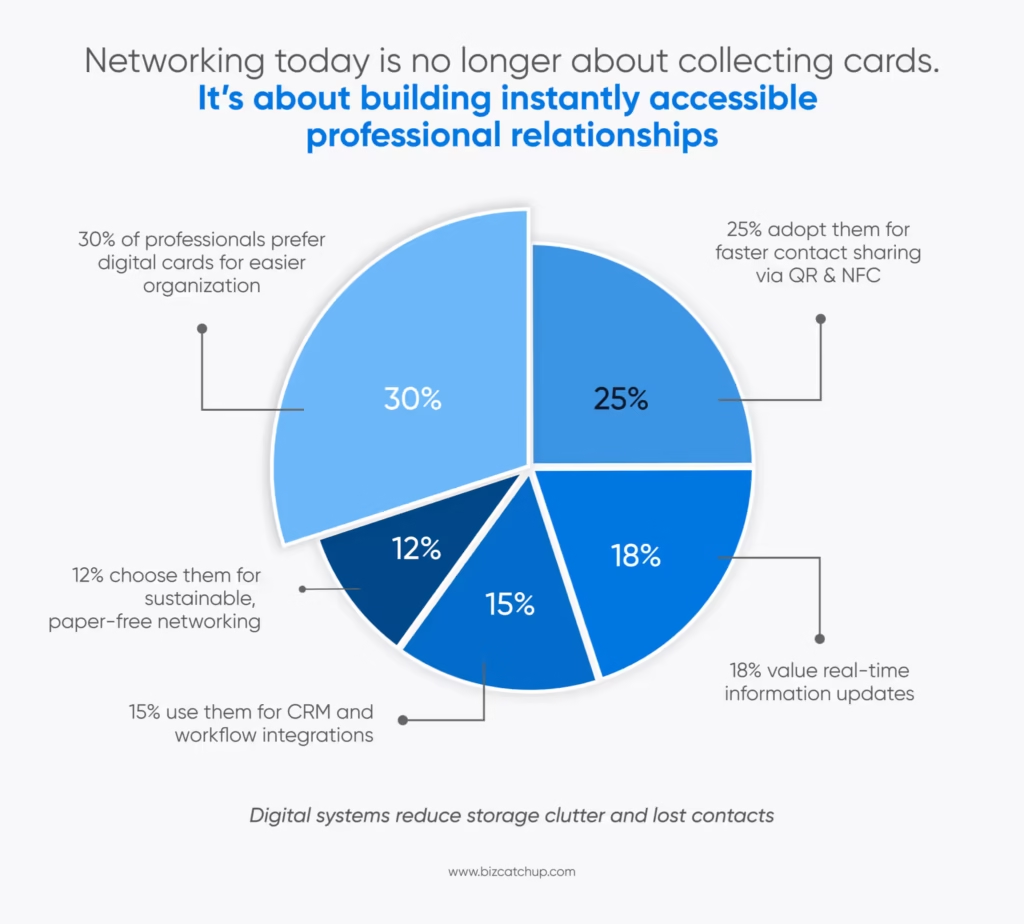
The following are some of the reasons businesses are no longer using hardcopy business cards:
Easier to Organise
Hardcopy business cards are hard to organise when there are a lot of them. When a professional attends business trade shows, conferences, or professional meetings, they frequently return from these events with hundreds of hardcopy business cards.
If an individual uses an electronic card management system to store their hardcopy business cards, the card management system will automatically sort the individual’s contacts and store each contact in a digital format.
Speedy Sharing of Contacts
Digital contact cards can be easily shared with everyone’s smartphones, as well as QR codes, with no need for a physical exchange of items.
Contact sharing has become much faster and smoother than when sharing business cards traditionally at events or conferences.
Environmentally Conscious
Printed business cards are generally recycled, but there is still a lot of waste associated with printing cardstock. Because electronic business cards utilize less resources than printed cards do, people will use less paper when sharing contact information.
Easy Access to Contacts
Electronic business cards are searchable instantly by name, company, industry, or tag. Instead of looking through piles of business cards to find an individual contact, users can access their contact information almost immediately using an electronic business card.
Instantly Update Information
One of the greatest limitations of using paper business cards to share information is that the content of a paper card can quickly become outdated. Sharing electronic business cards means you are able to update contact information across the board immediately after changes are made, eliminating inaccurate information being utilized.
Easier Integrations
Digital contact systems are much easier to integrate with CRM software, marketing tools, email platforms, customer list databases, and networking applications. Simplifying the sales workflow or relationship management makes these integrations possible in building a business.
How Does Electronic Business Card Management Works?
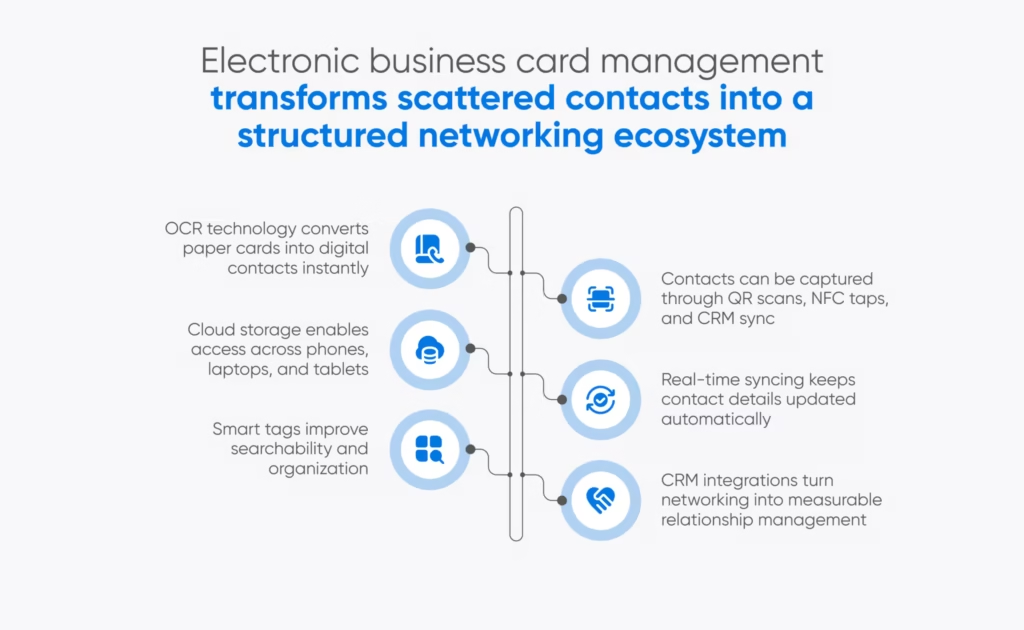
The management of an electronic business card (contact) begins with capturing, storing, organizing, syncing, and then finally sharing. electronically. This process typically happens in five stages.
1. Obtaining and Capturing Contact Data
Contact data can be obtained by means of:
- QR Code Scan
- NFC Tap
- Mobile Application
- Scanning an actual business card
- Email Import
- CRM Integration
- LinkedIn Synchronization
Most applications are utilizing OCR (Optical Character Recognition) technology to scan hard copy business cards and automatically create a digital version of the original business card.
2. Contact Information Can Be Safely Stored
Contact data is stored electronically in:
- Apps to manage contacts
- Storage in the cloud
- CRM data program
- Your mobile device’s Contacts
- Collaboration platforms for your team
- Cloud storage enables access from more than one device.
- Organizing Your Contacts
All of your contacts can be organized using:
- Tags
- Industrial type
- Events
- Where they live
3. How you will convert them into customers
The phase of being a lead:
- What type of customer they are
- The priority you give them
- Organization of contacts allows greater searchability and flow in your work process.
- Updating Your Information
Electronic systems allow information to be updated at any time as shown below:
- Phone numbers
- Email addresses
- Company names
- Links to social media
- Job titles
When updates are made, they automatically sync with everything you need without being printed out again.
4. Sharing Contacts
Through the use of:
- QR codes
- AirDrop
- Texts
- NFC-enabled devices
- Social Media
Networking is made much quicker with how digital business cards work.
Best Practices for Managing Digital Business Card
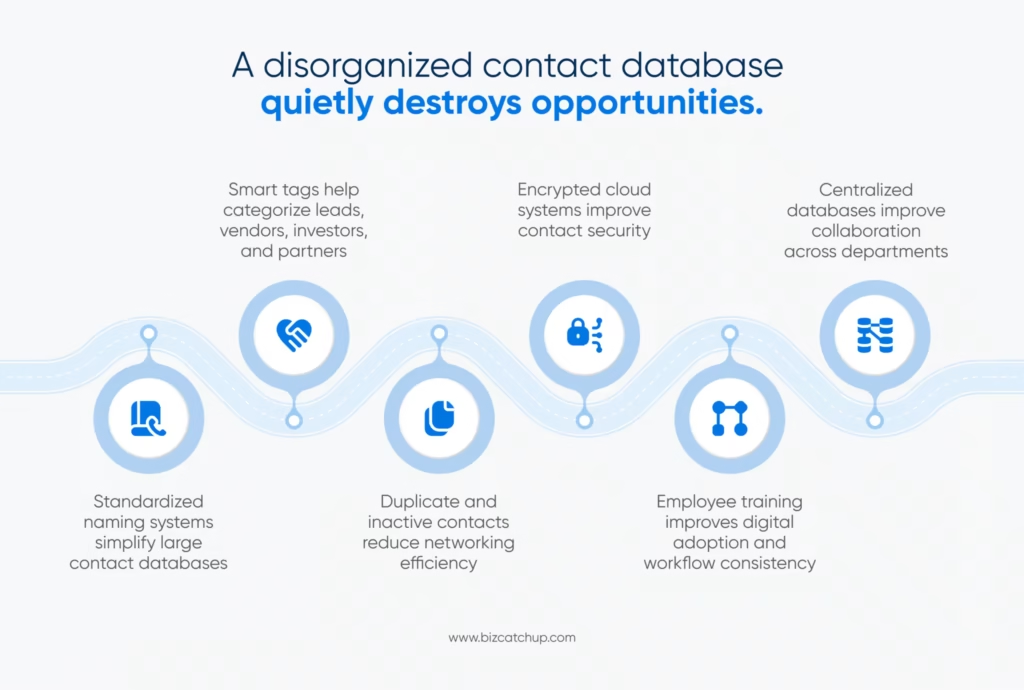
There are numerous ways a business manages digital business cards. Business Cards Are Scanned Without Your Knowledge. Apps that scan business cards convert those paper cards to digital contact information automatically.
Some of the common features of a business card app can include, but are not limited to:
- OCR scanning
- Cloud storage of your contact information
- Sync your contacts with your contacts
- Integrate your business card scans into a CRM system
- Eliminate duplicate entries
Organizing your contacts into smart categories
The apps will save time when entering data and improve the accuracy of the information. Store Your Contacts in the Cloud
Cloud platforms allow you to access your contacts from:
- Smartphones
- Tablets
- Laptops
- Desktop computers
Cloud platforms store your contacts in a way that protects them from being lost when your smartphone, tablet, laptop, etc., is damaged or replaced.
Integrate Contacts With CRM Software
Businesses that manage sales pipelines benefit greatly from CRM integration.
CRM platforms help businesses:
- Track interactions
- Monitor leads
- Schedule follow-ups
- Organise networking opportunities
- Maintain customer histories
This transforms simple contact collection into relationship management.
Use QR Code Business Cards
The use of QR codes allows users to quickly and easily share contact information with others. By simply scanning a QR code, users have access to:
- Contact information
- Websites
- Social media profiles
- Digital portfolios
- Appointment pages
As a result of the contactless networking trend, QR Code use for sharing information has grown in popularity.
Use Digital Business Cards with NFC Technology
NFC-enabled digital business cards allow users to share information by tapping their phones together. Reusable and programmable NFC Digital Cards a great option for modern-day business professionals.
Create a New Standard for Naming Systems
When looking at how to manage large contact databases, many businesses find that creating a standardised naming system is an important step toward managing them effectively. Some examples of a standardized naming system might include:
- Event name + company name
- Industry + location
- Lead type + acquisition source
Using these naming systems will help you filter and organise your contact database more effectively.
Using Tags and Categories
Tagging systems enable users to group contacts in a way that makes them easier to find. Examples of contact tag categories include:
- Potential clients
- Media contacts
- Investors
- Vendors
- Conference leads
- Strategic partners
Tags and categories of contacts assist with improving searches and improving communication workflow.
Regularly Clean Contact Database
Over time, working with a contact database leads to:
- Duplicate contacts
- Inactive leads
- Outdated detailed information
Cleaning your contact database at regular intervals leads to improved efficiency and accuracy of your contact list.
Advantages of Having Business Cards in Electronic Format
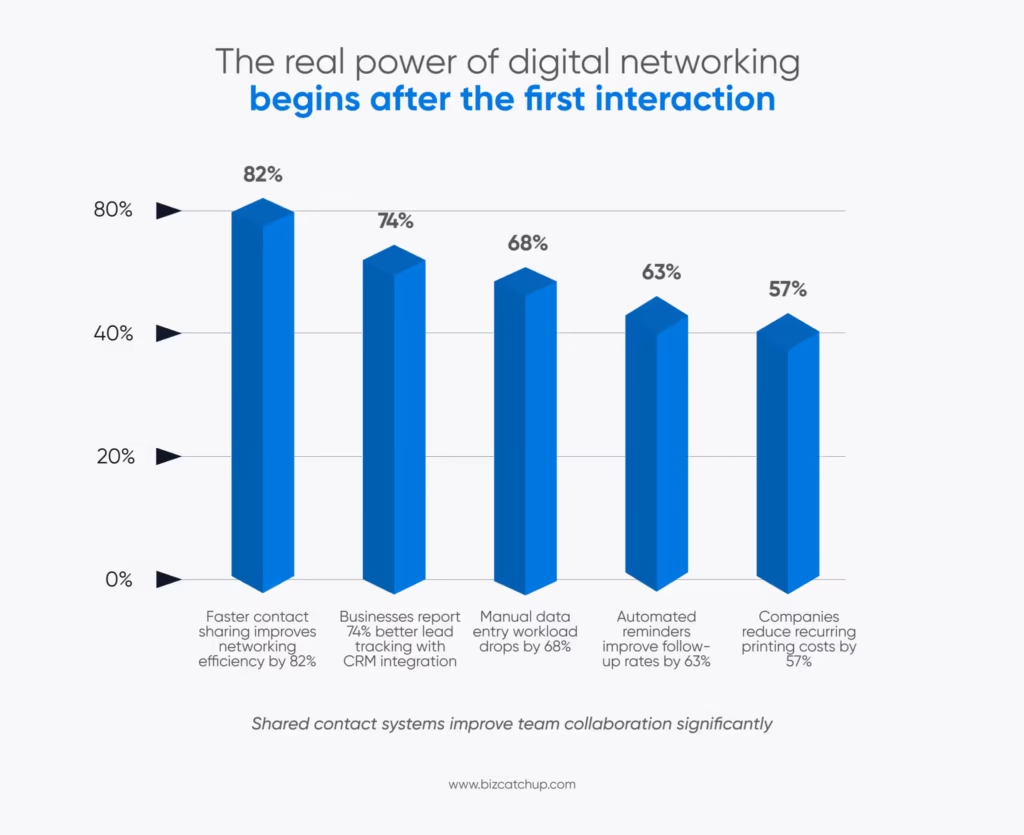
Electronic methods for managing business cards provide more than just convenience.
Increased Efficiency
The time spent on organizing and maintaining a manual record of your contacts is time that could have been spent building relationships.
The electronic business card management system allows for:
- Entering data
- Sorting of data
- Updating of data
- Automated reminders to follow up.
As a result, salespeople can concentrate on building real relationships with their clients.
Speedier Networking
Today’s networks require participants to operate quickly and efficiently. Digital sharing of business cards speeds up the process of making contact because it eliminates the time wasted looking for a physical business card or manually entering contact information.
Better Leads Management
Many businesses that manage electronic business cards have linked them to their CRM systems.
This allows salespeople to:
- Keep track of all of the communications they have had,
- Schedule meetings with their leads,
- Monitor the amount of time they engage with their leads, and
- Determine which leads they want to prioritize.
Better Professional Brand Image
Digital business cards can provide a wider range of brand representation than traditional business cards. Digital business cards can include:
- Brand images
- Logos
- Links to social mediaLinks to websites
- Links to videos
- Links to portfolios
Because these elements enable a more interactive representation of a professional brand than that provided by traditional business cards, it creates a greater potential for creating a stronger, lasting impression with prospects.
Reduced Printing Expense
Whenever your information changes, you have to reprint business cards. On the other hand, since your electronic business cards will not require reprinting, you do not incur additional expense for printing whenever your contact information changes.
Easier Collaboration among Team Members
All members of a business can access a shared list of contacts through synchronized systems. This allows for greater collaboration among:
- Sales teams, and
- Marketing teams, and
- Partnerships, and
- Recruiting departments
Promoting Sustainability
Reducing paper use promotes sustainability and reduces waste. Many businesses today are actively prioritizing environmentally conscious solutions for networking.
Data Privacy Concerns
Sensitive information includes contact information for the company. It is essential for companies to do the following:
- Keep contacts stored securely (secure storage)\
- Encrypt contacts (encryption)
- Control access to contacts (access control)
- Follow privacy laws and regulations (compliance with privacy laws)
Handling Contact Compatibility Problems
Not all contact management systems work well together. Some types of applications may not be compatible between:
- Android devices
- iOS devices
- CRM systems
- Contact databases
Before you start using a new system, always test to see if it will work with your current systems.
Issues With Duplicate Contacts
If companies do not manage their contact records properly, they can have a large number of duplicate records develop very quickly. Businesses should use contact management systems that have duplicate detection capabilities.
Resistance to Employee Adoption
Some professionals prefer to keep paper business cards for networking. A company may need a formal or informal training program in order to help facilitate digital adoption.
Reliance on Technology
Digital networking relies on the following types of technology:
- Smartphones
- Internet connectivity
- Battery power
- Access to software
When there is a technology failure, it may provide a temporary disruption to connectivity for digital networking.
Best Practices for Managing Electronic Business Cards
Businesses should utilize structured/documented processes for managing electronic business cards for long-term efficiency.
Centralize Contact Storage
It is a good business practice not to have scattered contact management systems across multiple devices and applications. Having a centralized contact database allows for more consistent management of contacts and can improve ease of access for all users.
Synchronize Contacts Across Multiple Devices
Using cloud-based technology to have a single source of updated contacts across all devices will minimize the chances of losing contact information.
Choose Secure Systems for Storing Contacts
When selecting a contact management system, look for the following types of security:
- Encryption
- Password protection
- Controlled access
- Backup systems
- Security should always be a priority.
- Train Employees Properly
To ensure that employees can:
- Share digital business cards
- Update business card contact information
- Organize business card contact information
- Safeguarding contact information for customers
- Proper onboarding improves system efficiency.
Schedule Database Maintenance
Cleaning up the database every month or quarterly prevents a buildup of junk in the database.
Review:
– Duplicate Contacts
– Inactive Leads
– Incorrect Information
– Unused Categories
Personalize Notes About Contacts
Adding notes after a meeting allows you to track the relationship you’ve established with that person over time.
Examples of notes include:
– Topic of meetings
– What interests the person has
– Follow-up actions required from both sides
– The type of information they prefer to receive
By keeping track of the above items, your future interactions will have greater meaning.
Electronic Business Card Use Differently Among Industries
Each industry has its own way of utilizing electronic business card systems.
Sales Teams
Sales professionals use digital contact databases to:
– Capture leads
– Track potential customers
– Schedule follow-ups
– Manage their pipelines
Recruiters
Recruiters use digital management systems to manage candidate information and build their network of contacts. This has increased the efficiency of hiring.
Real Estate Professionals
Real estate agents frequently trade contact information at property viewings.
Using digital cards allows them to build their professional network more easily.
Freelancers and Consultants
Freelancers are able to share their portfolios with potential clients immediately after meeting with them.
Event organizers use digital business card exchanges to connect attendees faster at conferences and networking functions.
The Future of Electronic Business Card Management
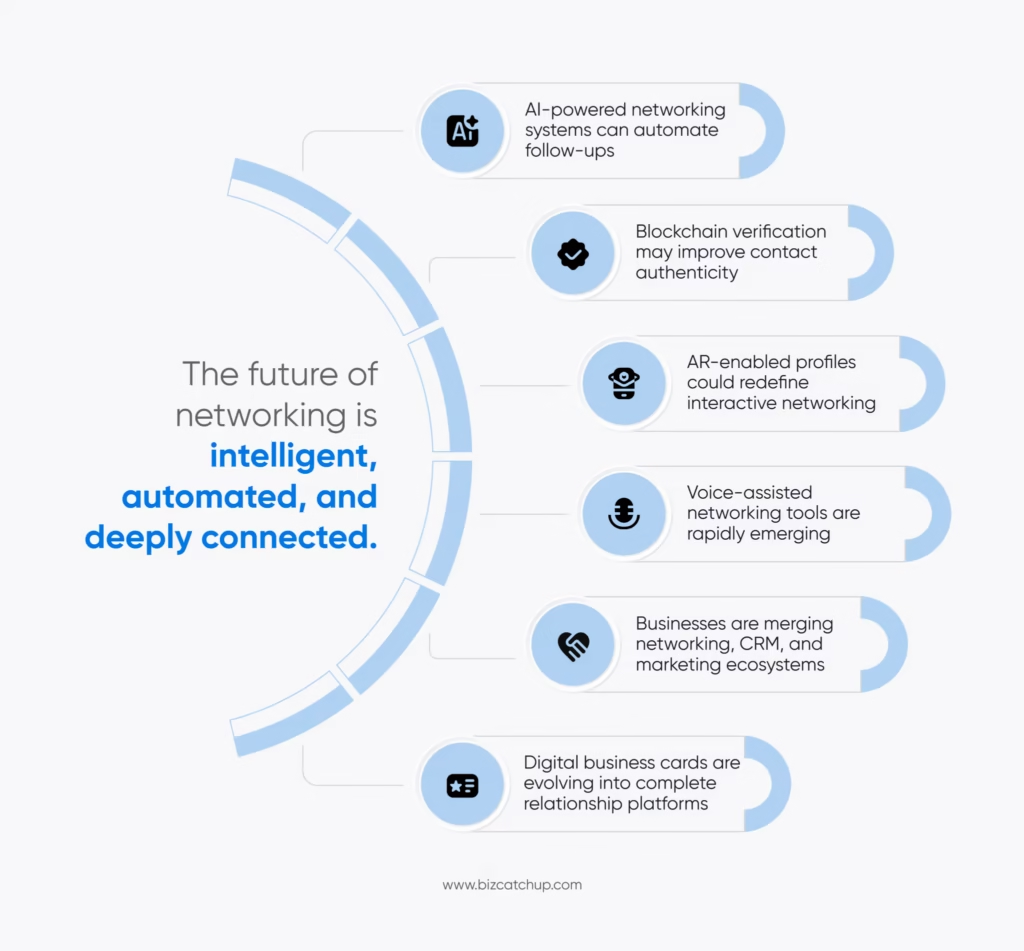
The future of networking for businesses is moving toward being more digital in nature.
Some emerging trends are:
– Contact Management powered by AI
– Network Analytics
– Automated Follow-ups
– Identity Verification via Blockchain
– Digital Profiles Enabled by AR
– Voice/AI Assisted Networking
Businesses are building an integrated ecosystem where Networking, Communication, Marketing and CRM Management work together seamlessly. Electronic business cards are no longer just alternatives to paper cards. They are becoming part of broader digital relationship management systems.
How Small Businesses Can Start Managing Business Cards Electronically
Small businesses do not require costly systems in their early stages.
A basic set-up for a small business would include:
- Select a digital Business Card solution.
- Scan your current hard copy Business Cards.
- Organize your contacts with tags.
- Sync your contact information to the cloud.
- Integrate your systems with a CRM system.
- Train employees on how to utilize these systems.
Regularly update your electronic database.
When you start with a simple system, it allows your company to gradually build an expandable and large system without a lot of work and cost up front.
Common Mistakes to Avoid While Setting Up Digital Networking Systems
A lot of companies have set up digital networking systems without a clear plan.
Keep in mind that many companies make these mistakes when setting up their digital networking system:
- Failing to Keep a Backup of Contacts
- It is essential to have backup copies of your contact database at all times.
- Failing to Categorise Your Contacts
- Your database can quickly become a chaotic mess without categorising your contacts.
- Using Too Many Applications
Summary
Today’s digital world has changed how businesses interact with their clients; it has changed the way we do networking. Today’s businesses need quicker, smarter and more organised ways of managing their relationships with other businesses. Managing your electronic business cards, storing them in the cloud, integrating your CRM system, utilising QR codes and using smart methods for organising your contacts can all be used to replace the random act of networking and replace it with a systematic effort to build strong business relationships. As technology continues to develop, networking continues to evolve through digital means.
FAQs
1. What is electronic business card management?
Electronic business card management is the process of capturing, storing, organizing, updating, and sharing business contacts digitally. It replaces paper business cards with digital contact information that can be accessed, managed, and shared from smartphones, cloud platforms, or CRM systems.
2. How do digital business cards improve networking?
Digital business cards make networking faster and more efficient by allowing instant contact sharing through QR codes, NFC, email, messaging apps, or social media. They also eliminate manual data entry, reduce the risk of losing contacts, and make follow-ups easier.
3. Can digital business cards integrate with CRM software?
Yes. Most electronic business card management solutions integrate with CRM platforms, enabling businesses to automatically sync contacts, track interactions, schedule follow-ups, eliminate duplicate records, and manage customer relationships more effectively.
4. What are the best practices for managing electronic business cards?
To manage electronic business cards effectively, businesses should centralize contact storage, synchronize contacts across devices, use secure cloud-based systems, organize contacts with tags and categories, regularly clean their database, and train employees on proper usage.
5. Is it worth switching from paper business cards to digital business cards?
For most businesses, yes. Digital business cards reduce printing costs, keep contact information up to date, improve collaboration, integrate with business tools, support sustainability, and make professional networking more organized and scalable than traditional paper cards.
