

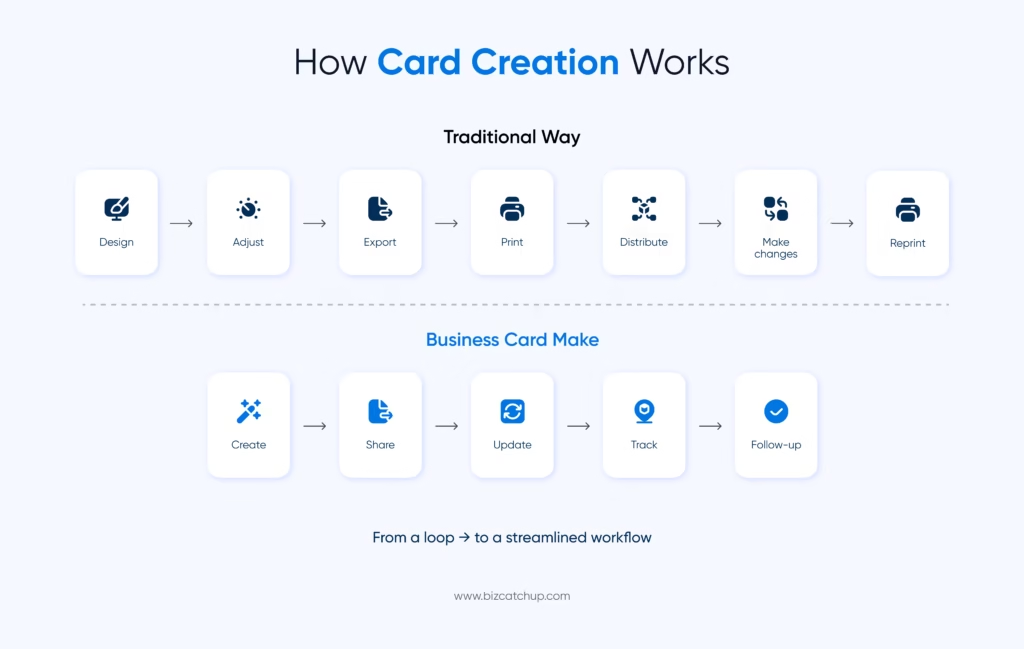
Working with design software such as Adobe Photoshop or Adobe Illustrator to create a business card can take longer than you’d like. You will spend time modifying layouts, fixing alignment issues, and exporting your design only to have to recreate everything if your information changes.
In addition, research shows that more than 80% of paper business cards will be thrown away within just one week after they’ve been given out. As a result, more and more people are using professional business card makers instead—faster, smarter tools built specifically for modern networking.
What Are Traditional Design Tools? (And Where They Fall Short)
Adobe Illustrator, Adobe Photoshop and other traditional design programs such as Canva make up the majority of design software—but they were built for many different creative projects, not just for business cards.
While these programs are robust, the learning curve can be quite steep for novices and people trying to produce a simple project quickly under a tight time frame.
You have to set up measurements, arrange image elements correctly, and have a print-ready file. These tasks will quickly consume your time. Time is lost and wasted each time you need to modify your contact information, and you will repeatedly have to re-upload your updated file and print your card again.
In addition, traditional design tools are only good for designing a card—they cannot help you with anything other than the design, such as digitally sharing it, doing real-time updates, tracking analytics, or even providing network opportunities.
What a Business Card Maker Actually Does Differently
Built for the Job
Business card creators are designed specifically for making business cards, and hence are already set up and ready to use. You receive existing (standard 3.5″ × 2″) templates, professionally created designs, and an easy drag-and-drop interface for modifying the template.
You do not have to worry about margins, bleed area or alignment. You can print your cards from home in a matter of minutes, even if you have never designed anything before.
Digital-First Functionality
More than just printed cards, today’s eBusiness card builders offer multiple features. They include automatic creation of QR codes, the ability to create shareable links and features allowing for instant exchange of contact information using NFC tap technology.
Updating your contact information only requires you to make a single change, and that change is reflected on all previously distributed cards. This makes them much more useful in a fast-moving world of business.
Collaboration and Team Features
For teams, these platforms provide centralized control. You can manage multiple employees’ cards, maintain consistent branding, and avoid duplicate outreach with shared contact systems. Administrators can use admin controls to update information for all members of an organization simultaneously and without delay.
Integrated Analytics
The other major benefit of using this type of platform is visibility. You will be able to see when an individual views or interacts with the card, as well as which link they click. This turns a simple card into a lead-generation tool—something traditional design tools simply can’t offer.
Traditional Tools vs. Business Card Makers
When you compare general design tools with dedicated business card generators, the difference comes down to efficiency, functionality, and long-term value.
Setup Time
Tools like Adobe Illustrator require manual setup and formatting. Business card designers come with templates that you can use right away.
Difficulty in Creating Designs
Traditional design tools usually require some knowledge of design. Business card designers make this much easier with drag-and-drop tools and pre-designed templates.
Changing Information
Whenever you change something with design software, you must edit and reprint each piece. With a business card creator, you simply make one change, and your changes reflect across all pieces of your cards.
Digital Sharing
Traditional tools typically only allow for the creation of a static design. Business card creators incorporate QR codes, links and NFC, enabling users to connect with others in one quick step.
Analytics
There is no method of analysing the engagement levels of a traditional tool. Business card creator provides analytics showing views, clicks and interactions.
Long-Term Cost
Reprinting paper cards is expensive. Digital business cards incur no recurring printing costs.
Team Features
Traditional tools are intended for one person, whereas business card creators allow for team management, shared databases, and brand consistency.
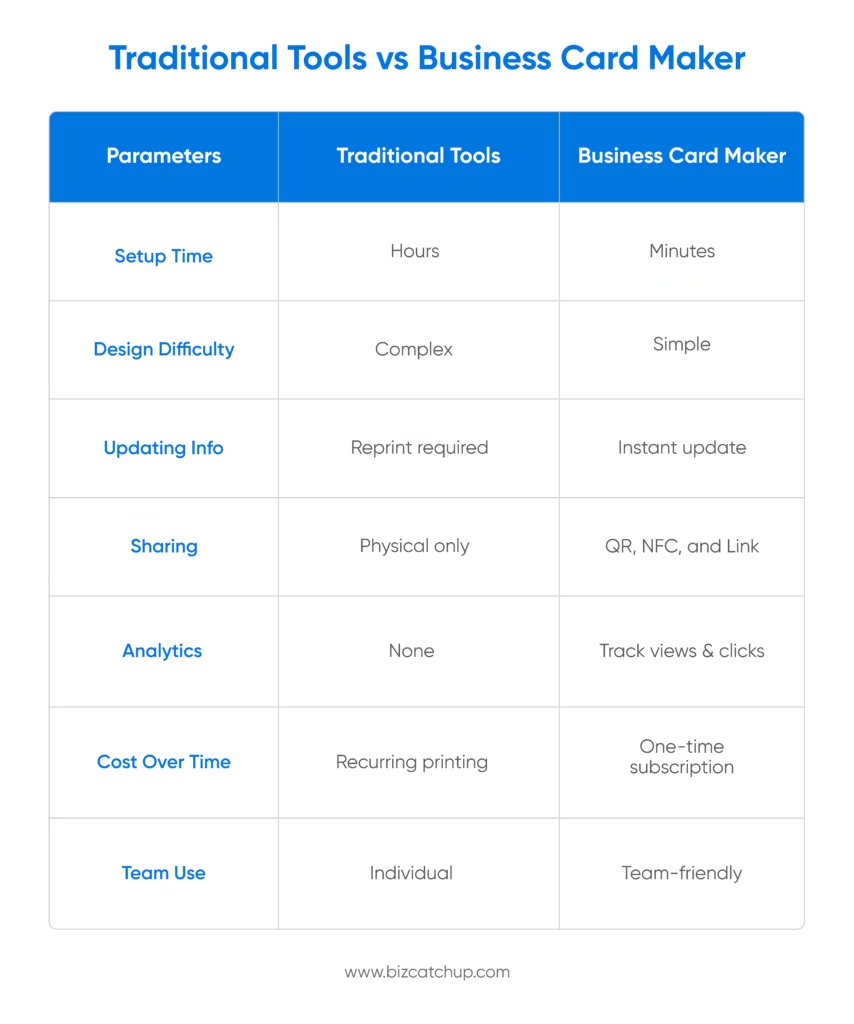
In short, traditional tools help you design a card, and a business card generator helps you use it effectively.
Who Benefits Most from a Business Card Maker?
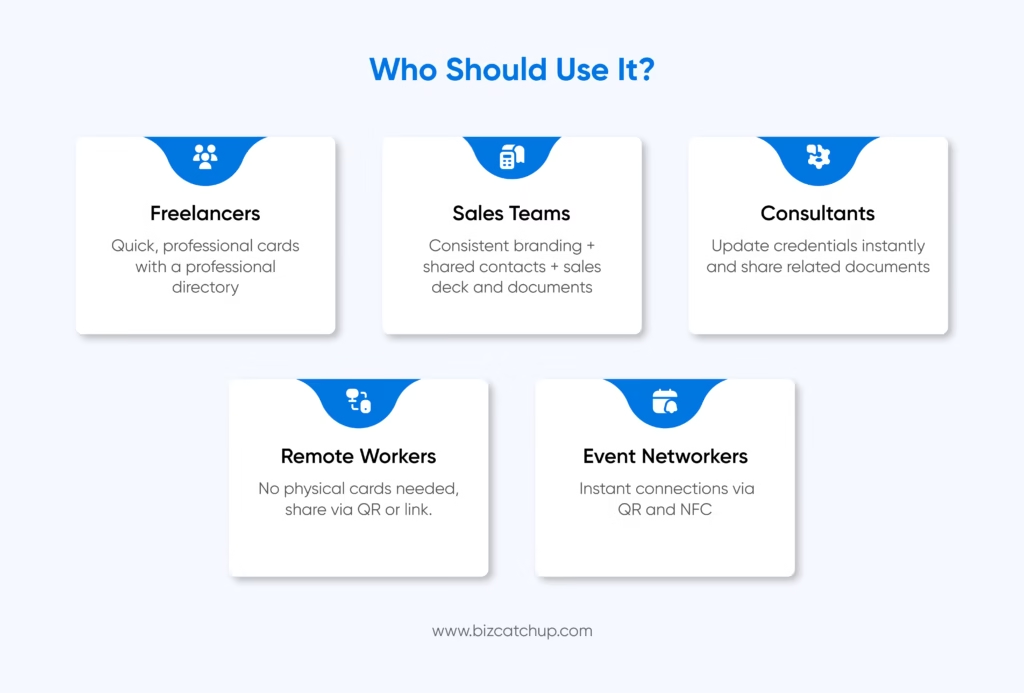
Freelancers and Solopreneurs
Can make their own professional-looking cards quickly, without having to hire a designer. Independent professionals also have the ability to change their services and data and republish their portfolio as often as needed.
Sales Teams
Can maintain consistent branding across several members of their team while still managing shared contacts without duplicating the outreach.
Consultants
Can also update their resume, certifications, or case studies without having to wait or reprint a consultant business card.
Remote Workers
Can present contact information without any physical cards; simply use a link (or QR code), so they can share contact information without needing a physical card.
Event Networkers
Exchange information instantly through QR scans or NFC taps, making follow-ups faster and more effective, making networking at events easier.
Final Thoughts
While traditional design programs can accomplish great things, they were never intended to be networking tools. It takes a considerable amount of time and effort to create and then alter your business cards through a traditional design program.
A dedicated business card maker simplifies the entire process, adds digital functionality, and keeps your information always up to date. Platforms like BizCatchup consolidate the process of designing, sharing, and tracking a business card so that you can use your business card, rather than having to work around it.
Quick Catch
What is a business card maker, and how is it different from design tools like Photoshop?
Business card creators are specialized tools for creating and sharing business cards quickly. Unlike general design tools, these include templates, options for digital sharing, and analytics, making them much more useful for networking purposes.
Is a business card maker better than Canva for creating professional cards?
Business card creation tools are better suited for use cases focused on networking. While Canva helps you design your own cards. They also have features such as QR codes, instant updates, and tracking contacts that make them more useful to professionals actively working to build their networks.
Can I update my details easily with a business card maker?
Yes, one of the biggest advantages of a business card generator is real-time updates. You can change your contact details once, and the updated information is automatically reflected across all shared versions of your card.
How does a business card maker help with digital networking?
With these tools you can instantly exchange information with QR codes, shareable links, and NFC technology. You can also track engagement and use analytics to make better use of your connections in order to create meaningful opportunities for you and your business.
Who should use a business card maker instead of traditional design tools?
A business card creation tool is ideal for freelancers, sales teams, consultants, and event professionals who frequently network. It saves time, ensures consistent branding, and offers features like analytics and easy sharing that traditional tools lack.
